Your legal documents generated and integrated in TOWeb in just 2 clicks
Free update for TOWeb 14 users. Your site's GDPR compliance has never been this easy.
Copy-pasting legal documents is over
How much time have you spent retyping your terms of use, privacy policy, cookie policy and terms of sale on your TOWeb site, page by page, clause by clause?
For a careful user, the procedure took 30 to 60 minutes per site, with a constant risk of transcription error: a misspelled company registration number, a GDPR retention period forgotten, a legal representative named in one document but not in another. Not to mention the regulatory updates nobody thinks to apply to all 4 documents at the same time.
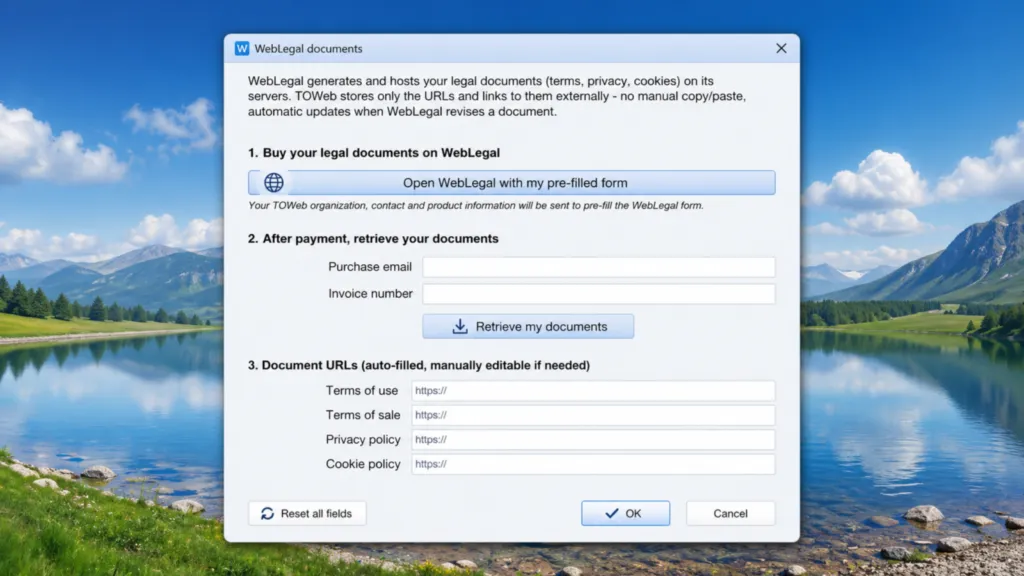
TOWeb 14.05 ends this chore. The new WebLegal Documents dialog, accessible directly from your site's configuration screen, automates the integration of all 4 mandatory legal documents in 2 clicks from TOWeb (with a checkout step on WebLegal in between).
Why this assisted integration
Before 14.05, integration followed a manual procedure in 8+ steps, none of them fun:
- Buy your documents on WebLegal
- Receive 4 URLs by email
- Open each URL, copy the HTML
- Create a TOWeb topic for each document
- Paste the HTML, adjust the columns
- Edit the page footer to add the links
- Disable indexing of the new topics
- Republish the site
The result worked, but the friction was high enough to discourage 70 % of purchases: how many times have you put off a legal investment by telling yourself "I'll do it later"? Later rarely happens.
The goal of 14.05 is simple: make WebLegal integration as fast as sending an email.
The new 3-step workflow
Step 1 — TOWeb pre-fills your WebLegal form
In TOWeb 14.05, open File > General → "WebLegal documents" button (or Settings > Cookies → WebLegal documents). The new dialog gives you a button:
"Open WebLegal with my pre-filled form"
Click. Your browser opens directly on the WebLegal form with about thirty fields already filled in based on the information TOWeb already knows about your site:
- Company name, registration number (SIRET / Companies House / etc.), VAT number, share capital
- Full postal address, country, applicable jurisdiction
- Legal contact email, phone, site URL
- Industry sector, presence of a product catalog, presence of forms
- GDPR compliance, publication director mention, founder
Immediate gain: ~10 minutes of typing avoided, and zero transcription error between your company profile and your legal documents.
Step 2 — You buy on WebLegal
You complete the few remaining fields (typically the activity-specific details), then choose your pack:
| Pack | Price | Documents included |
|---|---|---|
| Essential | €19.90 | Terms of Use + Privacy |
| Pro | €34.90 | Terms of Use + Privacy + Cookies |
| Business | €49.90 | Terms of Use + Privacy + Cookies + Terms of Sale |
At this stage, your documents exist and are already publicly accessible, but your TOWeb site doesn't know about them yet.
Step 3 — TOWeb retrieves your documents automatically
Back in TOWeb. In the same dialog, two fields are waiting for you:
- Purchase email: the one you used on the WebLegal form
- Invoice number: copy-pasted from the WebLegal confirmation email
You click "Retrieve my documents". TOWeb queries the WebLegal API and automatically places the 4 URLs at the right spots in your site:
- The terms of sale link (footer, checkout acceptance checkbox) points to your WebLegal Terms of Sale
- The privacy policy link (cookie banner "Learn more") points to your WebLegal Privacy Policy
- TOWeb's internal TOS topic (which previously held the historical Lorem ipsum placeholder) is no longer published — your site uses your external WebLegal documents
- 4 new tokens (%TW-CGU-LINK%,%TW-CGV-LINK%,%TW-PRIVACY-LINK%,%TW-COOKIEPOLICY-LINK%) become available so you can insert these links anywhere you want (custom footer, legal mentions, contact page, etc.)
You republish your site. Done.
Total: 2 clicks in TOWeb + a checkout on WebLegal. Count 5 minutes end-to-end.
Why WebLegal and not a free template found online
Fair question. The answer comes in four points.
1. AI personalization, not a fill-in-the-blanks template
Free generators (and even some paid ones like Iubenda's basic plan) produce generic documents with blanks to fill in. The result is legally useless: a generic document that doesn't reflect your actual activity won't protect you.
WebLegal uses an AI engine specialized in digital law that drafts clauses personalized to your case — type of products or services sold, delivery terms, target jurisdictions, personal data actually collected.
For a deeper dive on the difference between a specialized AI generator and a free template: AI Legal Document Generator: Complete Guide 2026.
2. Multi-jurisdiction native
Your customers aren't all in your home country. WebLegal generates documents compliant with several regulations in parallel:
- GDPR (European Union)
- CCPA / CPRA (California)
- UK Data Use and Access Act (United Kingdom)
- LGPD (Brazil)
- PIPEDA (Canada)
- Privacy Act 2026 (Australia)
If your site targets multiple markets, your documents reflect that. A free local template only covers one country.
3. Inter-document consistency (GDPR Article 30 audit-ready)
The classic trap: data retention period mentioned in the privacy policy but not in the terms of sale. Or Stripe listed as a sub-processor in the cookie policy but forgotten in the privacy policy. At the slightest GDPR audit request or data protection authority complaint, these inconsistencies cost you dearly.
WebLegal generates the 4 documents simultaneously from the same processing register, which guarantees perfect Article 30 consistency. That's what distinguishes a real professional generator from a patchwork of templates.
4. Updates included
Regulations evolve. Google Consent Mode v2 became mandatory in March 2024. The Data Use and Access Act replaced UK GDPR in June 2025. California strengthened CPRA requirements in January 2026. If you bought a template in 2023, your site is non-compliant today.
WebLegal pushes updates automatically. Since TOWeb 14.05 only stores the URL of each document (not its content), your site benefits from the latest version with no action on your part.
The cookie banner companion
This article covers legal documents. There is a second TOWeb 14.05 novelty: the WebLegal cookie consent banner that replaces TOWeb's previous built-in banner. It's free and compliant with GDPR + Google Consent Mode v2 with no configuration.
Read: TOWeb 14.05 — The new WebLegal cookie consent banner.
The two devices are complementary:
- The cookie banner handles consent before any cookie is dropped
- The documents (Terms of Use, Privacy, Cookies, Terms of Sale) explain to your visitors how you process their data and the conditions under which you sell
Without a proper banner, you violate the ePrivacy Directive (Article 5(3)). Without documents, you violate GDPR Articles 13/14. Both are mandatory.
What does it really cost
Let's do the honest math.
| Solution | Initial cost | Updates | Multi-jurisdiction | Year-1 total |
|---|---|---|---|---|
| Dedicated lawyer | €800-1,800 | +€200-400/year | Yes | €1,000-2,200 |
| Free Google template | €0 | None | No | €0 (but non-compliant) |
| Iubenda (Pro plan) | €99/year | Included | Partial | €99 |
| WebLegal (Business pack) | €49.90 | Included | Yes | €49.90 |
The cost of inaction, on the other hand, is in another dimension: Legal mentions: €75,000 fine if missing.
Which documents for which site
The pack you need depends on your activity.
Showcase site (presentation, contact, no sales):
- Terms of Use + Privacy + Cookies → Pro pack €34.90
E-commerce site (selling products or services):
- Terms of Use + Privacy + Cookies + Terms of Sale → Business pack €49.90
Informational site without complex data collection (personal blog, portfolio):
- Privacy + Cookies are enough in most cases → Essential pack €19.90
For the regulatory detail of which document is mandatory for your activity: The 4 mandatory legal documents for any e-commerce site.
How to benefit
You're already on TOWeb 14 (14.00 to 14.04): the upgrade to 14.05 is free. Download the latest version and use the new WebLegal Documents button appearing in your interface.
You're still on TOWeb 13 or earlier: the assisted integration feature does not exist in your version. To benefit from it (and from many other v14 novelties), consider upgrading to TOWeb 14.
You're new to TOWeb: try the free edition. The WebLegal integration feature is available in all paid editions (Pro, Business, Studio).
In summary
| Before TOWeb 14.05 | After TOWeb 14.05 |
|---|---|
| 8+ manual steps | 3 automatic steps |
| ~30 minutes per site | ~5 minutes |
| Risk of transcription error | Zero repeated typing |
| Updates to apply manually | Auto-applied via external URLs |
| No guaranteed inter-document consistency | Article 30 audit-ready |
Question, feedback, suggestion? Contact our technical support directly from TOWeb.