Your cookie banner now powered by WebLegal
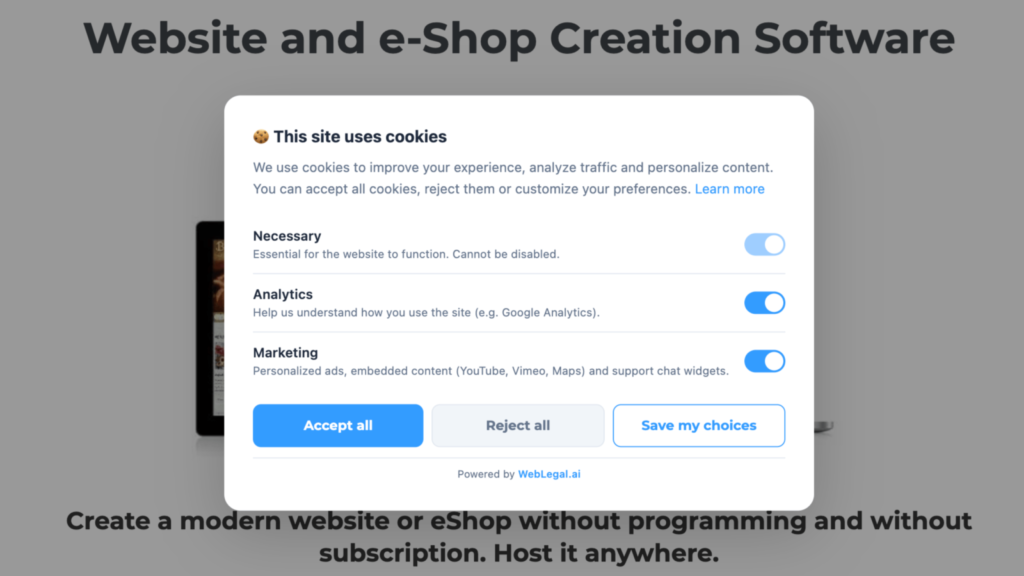
If your TOWeb site still displays a cookie consent banner from a previous version, chances are it needs an upgrade in 2026. The regulatory landscape is evolving fast: stricter rules from data-protection authorities, Google Consent Mode v2 becoming mandatory for advertising and analytics, and tighter blocking requirements for third-party trackers. Until now, every legislative change forced you to republish your site to stay compliant.
With the TOWeb 14.05 update, free for any TOWeb 14 licence holder, your cookie banner automatically switches over to the WebLegal CCB — the new Cookie Consent Banner from WebLegal. It is modern, lightweight, compliant, and most importantly it keeps itself up to date without you having to republish your site every time the rules change.
Why your TOWeb site's banner needs to evolve
TOWeb 9 introduced a first consent banner to collect visitor cookie preferences. It has served thousands of TOWeb sites well for years. But the legal framework around it has tightened considerably since its introduction:
- Every new regulatory requirement forced you to republish your TOWeb site to apply it (a new category, a mandatory legal text, a revised consent format). You had to keep an eye on legal news and republish manually every time.
- Google Consent Mode v2 became mandatory in March 2024 for any advertising or analytics measurement on European visitors — something the previous banner did not support natively.
- Setup was done service by service, which correctly covered the list of known services at publication time, but left out any custom third-party script you may have added yourself to your <head>.
The WebLegal CCB solves all these points and, crucially, updates itself.
Real tracker blocking, not a cosmetic banner
The WebLegal CCB automatically detects and blocks 37 known third-party services before any consent: Google Analytics, Meta Pixel, Hotjar, TikTok Pixel, LinkedIn Insight, Intercom, YouTube, Vimeo, Google Maps, and many more. The list is maintained on the WebLegal side, with no action required from you.
Better still: if you have added a third-party script yourself to your <head> section (a mailing tool, a chat widget, an alternative analytics solution), the banner respects what the visitor decides for that script too. That is a case the previous banner could not anticipate.
Native Google Consent Mode v2
Google Consent Mode v2 is now a must-have if you use Google Ads or Google Analytics 4. The WebLegal CCB implements it natively: visitor consent is properly transmitted to Google from the very first click, without you having to touch a single script. Your ad campaigns remain measurable and your GA4 data compliant.
Your SEO preserved — a rare argument
Here is a point no other free cookie banner handles correctly: search-engine crawlers from Google, Bing, Yandex, DuckDuckGo, as well as social-preview bots (Facebook, WhatsApp, LinkedIn, Twitter/X) see your full content, not a consent banner.
Without this precaution, Googlebot would index a degraded version of your site where YouTube videos, Google Maps maps and other embeds would be replaced by "accept cookies to view this content" placeholders. The outcome: lower search rankings, weaker Google snippets, broken social previews. The WebLegal CCB automatically detects these bots and serves them the content as-is, without ever storing a cookie. Human visitors, on the other hand, do see the banner and their choices are strictly respected.
A more modern interface for your visitors
From the visitor's side, the change is visible at a glance:
- No more service-by-service activation. The visitor chooses by category (strictly necessary, analytics, marketing, functional) — faster for them and more aligned with data-protection authority guidelines.
- A preferences reopen button always available, clearly identifiable, placed at the screen corner (similar to Cookiebot or OneTrust).
- A clean design, automatic dark mode, light/dark/auto themes, and colours you control from TOWeb.
- 30 supported languages, automatically detected from the visitor's browser.
A drastically simplified setup in TOWeb
In the previous banner, you had to enter each third-party service, each label, each category manually. With the WebLegal CCB, the TOWeb GDPR panel shrinks to the essentials:
- Enable WebLegal as the default banner (already ticked after upgrade).
- Choose a main colour (automatically picked up from your TOWeb theme).
- Choose a theme: light, dark, automatic.
- Optional: enable the side reopen tab.
That is all. All the blocking logic, service detection, translation and legal compliance live on the WebLegal side, and evolve without you touching your site.
Automatic updates — you no longer republish
This is probably the most concrete long-term gain. The CCB script is loaded from weblegal.ai. When regulations evolve, when a new tracker appears, when a new language is added, or when Google updates its Consent Mode, you have nothing to do. No new TOWeb publication, no manual site update, no script to re-paste. Your banner stays compliant at all times.
Fines are not theoretical
As a reminder, a non-compliant banner can cost you dearly. Data-protection authorities have sanctioned websites to the tune of hundreds of thousands of euros, and European regulation allows for fines of up to 4% of annual turnover or 20 million euros for the most serious breaches. The specific rules around cookie consent and the sanctions that go with them are detailed in Cookie policy: rules and sanctions.
The banner is not everything — do not forget your legal documents
A compliant cookie banner is necessary but not sufficient. To be fully in order, your site must also provide a privacy policy, legal notices, a cookie policy, and where applicable terms and conditions aligned with the most recent case law. That is exactly what the WebLegal packs cover in addition to the CCB, at a cost that has nothing in common with hiring a lawyer (count about ten euros a month versus several thousand euros for bespoke drafting).
How to benefit from it
Already on TOWeb 14?
Download the 14.05 update and republish your site. The WebLegal CCB is enabled by default in the GDPR settings. If for any specific reason you want to revert to the old banner, you can re-enable it manually in the same settings.
On TOWeb 13 or an earlier version?
This is the right time to move to TOWeb 14. The upgrade gives you access not only to the built-in WebLegal CCB, but also to the full set of V14 novelties (native invoicing, e-commerce improvements, new widgets, etc.). Check the TOWeb 14 upgrade pricing — the cost stays well below the risk of a data-protection sanction.
Not willing to upgrade?
You can integrate the WebLegal CCB manually on your existing site by pasting the script provided on the weblegal.ai/en/cookie-banner/ page into the <head> section of your TOWeb site. What you still gain with TOWeb 14.05 is an integrated setup and guaranteed visual consistency with your theme.
Upgrading to TOWeb 14
To upgrade:
→ Install TOWeb 14 on the computer where your current TOWeb version (1 to 13) is installed, launch TOWeb 14, then click License / About in the File step.
→ Or use the information of your latest TOWeb purchase invoice and go to the TOWeb license upgrade page.
If you encounter any issues to upgrade, you can contact our sales team by using our contact form.