TOWeb 14 documentation (archive)ContentsDiscover TOWeb 15 →

TOWeb: the update history, from V14 back to V5

Contents

TOWeb V14 updates

logo of toweb
V14

The version 14 of TOWeb brings many new major features, modernizes your website, improves its performance and SEO...


Discover all the new major features of TOWeb V14


09/10/2026 - TOWeb version 14.10.112

  • New : Enhanced security for sites hosted on Apache web servers. The new "Reinforce the security of this website (Apache web server)" option, located in the "Options > Security & HTML" screen, allows you to bolster your web server's security. This option, not enabled by default, should only be activated if your server is an Apache web server, otherwise it may trigger an internal server error rendering your website inaccessible (in such a case, you would need to uncheck this option and republish your site again entirely).
  • New : Right of withdrawal compliance for digital products. A new option "Ask for an explicit waiver of the right of withdrawal when the order contains downloadable products" is available under "e-Commerce > Withdrawal". When enabled, a separate checkbox appears in the order form only if the cart contains at least one downloadable product. The customer expressly requests that the download start immediately and acknowledges losing the right of withdrawal - the two conditions set out in Article 16(1)(m) of EU Directive 2011/83/EU. The order cannot be submitted until it is ticked, and the consent is stored with the order and repeated in the confirmation e-mail. The wording is translated and proposed by default into every site language but can be modified if you need to. This new option is off by default meaning that existing shops keep their current behaviour until it is turned on.
  • Images manually selected and added to the "og:image" meta tags in Group/Blog topics were sometimes lost or disappeared after saving.
  • The customizable "More..." text for links/buttons on the index page of Group/Blog topics did not account for language settings on multilingual sites.
  • The "View the full FTP server log" link, displayed after a failed publication, was not always working.
  • Some default values for the Mondial Relay delivery method used an incorrect format.
  • An apostrophe, a quotation mark, or a backslash in the text of a custom checkbox on the order form could render the order form inoperable.

08/11/2026 - TOWeb version 14.09.111

  • New : Enhanced security for published sites. The jQuery JavaScript library used by all generated sites has been updated from version 1.10.2 to version 3.7.1, and older libraries have been removed, including a Flash video player identified as vulnerable. Security headers are also automatically added to your site's .htaccess file. Auditing tools that previously flagged vulnerable components on TOWeb sites no longer detect them.
  • New : Captcha protection for customer account access. By using Turnstile or reCAPTCHA protection on your site, it now applies to both logging into a customer account and creating a new one, preventing bots from creating accounts or trying passwords.
  • New : Email notification for booking cancellations. When visitors cancel their reservation using the link received by email, a message is now automatically sent to both you and them. Previously, the cancellation was recorded, but no one was notified.
  • New : Your published sites are significantly lighter. TOWeb now only uploads the files actually used by your site to your web hosting: a single style variant instead of four, two font formats instead of six, the single calendar language you need instead of sixty-two, and several other potentially unused libraries. Furthermore, the same font could be requested four times consecutively from Google Fonts, unnecessarily slowing down page load times. A representative site's technical files go from approximately 3 MB to 1.8 MB, and a site already online can benefit even more upon its next full release.
  • Important : Update required to continue using the AI assistant. This update is necessary because the AI access method used by previous versions of TOWeb will be disabled shortly after the release of this version 14.09. Users who do not update TOWeb will lose access to artificial intelligence features. Furthermore, the AI message displayed when the limit is reached now clearly indicates what the limit is and what you can do.
  • Some pages could be considered nonexistent by Google (flagged as "Soft 404") even though they displayed normally.
  • Your site's back office could display completely blank pages. On recent hosting plans (PHP 8), the order page (and sometimes the entire back office) could appear empty, without any error message. Two causes have been fixed, including an interrupted order save that left an empty file blocking display. Affected orders become visible again after republishing. 
  • Link, icon, or abbreviation insertion windows called from the text editor could disappear into the background and appear to freeze the software, especially after a backup or restore. The same flaw also caused TOWeb to crash when closing after inserting a script field.
  • An error message would appear upon closing after approximately one hour of use. A system error ("EOSError, code 1400") could be displayed when closing the software after a prolonged session.
  • A product page in a catalog could disappear from your site without any notification. When two product pages had the same filename, one would silently overwrite the other upon publication. Furthermore, the "canonical" link provided to search engines pointed to the catalog's index page instead of the product page itself, which negatively impacted your product ranking.
  • The description and keywords for artificial intelligence entered on a product page were applied to all pages in the same category. Each page now retains its own, as was already the case for the other tabs (Open Graph, Head, and Keywords).
  • Websites displaying items without selling them online could receive hundreds of warnings from Google requesting a price or customer review because TOWeb described these pages as products for sale. This is no longer the case when the catalog does not include prices.
  • The back office for comments posted on a website could sometimes never be published and display a message "i-Service Blog Comments unavailable." If you encountered this problem, a simple re-posting will allow you to view all comments posted by your website visitors from your back office and directly delete any you wish.
  • Customer accounts created by your visitors on your online store were not always saved by TOWeb. They are now retrieved to your computer and can be automatically restored to your web space if necessary.
  • Removing a user's access to a password-protected section could have no effect.
    Twitter account verification was incomplete.
  • In certain circumstances, such as reopening TOWeb, the maximum cookie expiration time was reset to the default value of 365 days. If you had changed this, or if you wish to change it to a value other than 365, you must do so from the "Options > Cookies & Privacy" screen.
  • On pages accepting comments posted by visitors with star ratings, the text of the messages was displayed in a font that was much too small and in the color of the stars instead of the normal text color. 
  • An error could occur when changing the Theme's slideshow options and then saving, with the risk that these changes would not be saved correctly.
  • Part of the TOWeb window for adding or modifying a "Date" field in a form could be displayed in the wrong color depending on whether the interface was in dark or light mode.
  • If you previously used a script to open a popup window, it will no longer open because the old version used a library that is no longer embedded in the now-lighter published websites. The examples on this page of our online help have been updated with equivalent code that no longer depends on any library. Replace your script with the new example, and your popup will work exactly the same again.
  • Links to blog comments entered by visitors now open securely, and a warning that could appear with PHP 8.2 in comment processing has been removed. Furthermore, the "website" field in the form is no longer pre-filled with "http://".

07/06/2026 - TOWeb version 14.08.110

  • PHP versions 8.4 and 8.5 introduced compatibility issues, which could lead to the display of "deprecated" warning messages on some web pages, particularly in customer accounts on e-commerce sites
  • The total for a line item was incorrect when an item was ordered in multiple quantities; its amount was multiplied one too many times by the quantity. The overall invoice total, however, remained correct
  • On an invoice with multiple VAT rates, all VAT lines displayed the same amount (the total VAT) instead of the amount specific to each rate (5.5%, 10%, 20%, ...)
After installing this TOWeb update, proceed as follows:
1) Republish your entire site (not just the changes)
2) Then, to update your invoices from your site's back office:
  • Press Ctrl + click (or ⌘ + click) on the "Invoice" button of the invoice you want to update
  • Press Ctrl + Shift + click (or ⌘ + Shift + click) on any "Invoice" button to update all your invoices

06/19/2026 - TOWeb version 14.07.109

  • New : Automatic management of the right of withdrawal, allowing you to bring your online store into compliance with the new European legislation (EU Directive 2023/2673, effective June 19, 2026) in order to avoid being exposed to sanctions and fines. TOWeb automatically adds a « Withdraw from the contract here » link to the footer, guiding your customers through the cancellation process. Simply republishing your site is all it takes to make it compliant, and you retain full control:
    • Place the link wherever you want on your pages by simply inserting the name of the new field %TW-WITHDRAWAL-LINK% (ideally in the footer so it remains visible everywhere).
    • Configure or disable the feature (withdrawal period, etc.) from the new "E-Commerce > Withdrawal" screen.
    • In the event of a cancellation, you and your customer will receive an email notification, and the customer's order status will be automatically updated and managed by your website's back office.
  • The cookie customization button managed by WebLegal no longer appears twice on pages displayed as an overlay via a link
  • Fixes for both the predefined fields %TW-CGU-LINK% and %TW-COOKIEPOLICY-LINK% used by WebLegal which were generating empty links (the default texts for these two fields on your site can be modified as you wish in "Options > Translate predefined texts")
  • The {PARTY_SIZE} field, which can be used in emails sent by the TOWeb online booking system, could be replaced by empty text instead of the number of people in each booking
  • Replacing an existing image with another inside a paragraph could not be saved correctly thereafter, resulting in the loss and/or non-display of that image
  • Using the site's local search from the "Topics" step could display a completely blank page instead of the search results page

06/01/2026 - TOWeb version 14.06.108

  • New : Different booking prices depending on the number of people. The TOWeb booking system now allows you to apply different prices based on the number of people from by activating the "Pricing per number of guests" option of the widget (under Resources > Pricing Configuration)
  • Improved user interface when editing certain topics:
    • two action buttons "Add a paragraph" and "Add a panel" now located at the bottom of any catalog product screen
    • two action buttons "Edit group content" and "Add a section" (to the group) now located at the bottom of any blog/group topic screen
  • On multilingual sites, some hreflang tags could contain incorrect URLs
  • The site optimizer could not correctly detect all WebLegal documents embedded in a site and incorrectly report deficiencies and/or advice related to them
  • Some Facebook URLs could be incorrectly detected as broken links by the site optimizer

04/30/2026 - TOWeb version 14.05.107

  • New : Cookie consent management by WebLegal. Now offered by default on all TOWeb sites, the cookie consent management system is now powered by WebLegal.ai : more powerful, clearer for your visitors, even more GDPR compliant and scalable, in addition to being easier to configure ! And when you add scripts from services other than those offered by TOWeb to your site, their cookies will also be handled by WebLegal, which covers more than 20 additional services (Hotjar, Microsoft Clarity, Matomo, Plausible, TikTok Pixel, LinkedIn Insight, Google Ads Remarketing, Intercom, Crisp, Tawk.to, Zendesk, ...)
  • New : Your legal documents integrated by an assistant. Available via the new "WebLegal documents" button located in the "File > General" screen (but also in cookie consent configuration of your site), this assistant helps you integrate all your WebLegal.ai documents into your site without having to manually copy and paste their content into your sections. If you ever wish to cancel this integration and do it yourself by copy/paste, you will need to reopen this wizard and use the "Reset all fields" button before clicking OK in this wizard.
  • New : Automatic generation of JSON+LD structured data for improved SEO. Your company information (entered in the "e-commerce > Legal Information + Contact + SEO / Social Networks" step) is now automatically generated on your site as JSON+LD structured data, along with product information from all your catalogs, for better search engine ranking and Google rich snippets use. Enabled by default, you can disable this feature if you wish via the "Automatic generation of JSON+LD structured data on each page" option located in "e-commerce > SEO / Social network".
  • New : Export of your plannings/calendars. In addition to the ICS import but your "planning/calendar" topics can now be exported too with a new button to export all your events in ICS format. This will be useful for example if you need to transfer them to another tool (Google Calendar, Outlook, Apple Calendar, etc).
  • The width and height are now indicated in all images included on web pages to improve the page display and search engine optimization (SEO).
  • Previously, generating invoices from a website's back office could not display VAT. If you need to regenerate one or more invoices (with the same invoice number but with VAT and a new format), republish your entire website before proceeding as follows in your back office:
    - Regenerate a single invoice:
    CTRL + click on the green "Invoice" button
    - Regenerate all invoices:
    CTRL + SHIFT + click on any green "Invoice" button
  • The default duration for cookie consent has been changed from 1 year to 6 months (180 days) to comply with WebLegal.ai

04/01/2026 - TOWeb version 14.04.106

  • New : A complete invoicing system integrated into your e-commerce site's back office including company setup, automatic generation of numbered invoices, and one-click sending to your customers.
  • Depending on the theme and styles used by a site, the footer could display at the wrong dimensions for pages using password protection.
  • In certain circumstances, TOWeb's AI agent was not displaying any error nor usage restriction message.
  • Changing site versions from "File > Versioning" is now disabled while a publication is in progress to prevent inconsistencies and data loss.
  • When configuring certain booking systems, changes to resource/sub-resource quantities might not be saved or applied.
  • On some Italian-language sites, the booking system could sometimes malfunction, displaying the error message "Error: BOOKING_WIDGET_STRINGS is not defined".
  • Although incompatible with older PHP versions 5.xx and only versions 7 and above, the website's back office has been improved to ensure minimal usability with obsolete PHP versions.
  • Mac version only: Due to issues with date selection in the TOWeb user interface, date changes are now made via direct entry and/or using its up/down buttons.

02/20/2026 - TOWeb version 14.03.105

  • New : Apply progressive display to your blog content to allow for faster loading and display in web browsers. Indeed, if you have created a Group/Blog containing many posts, not only may its display take a long loading time, but its scrolling may seem endless to visitors. By choosing to limit the loading and display to, for example, 10 or 20 articles at a time, your visitors will discover your latest posts on a lighter page, while having the option to click at the end of the page each time to see your older posts. This option also applies to blogs using the keyword filtering feature.
    As an example, this feature is used on our own site in the TOWeb Blog.  
  • New : Automatic addition of "canonical" tags by TOWeb to systematically indicate to Google the official version of each of your pages when they may have multiple URLs displaying the same content (such as links to a specific paragraph of one of your sections, when displaying a section integrated in an overlay window, when navigating through the photos of an album from its index page, and many other situations where pages of your site may accept parameters).
    IMPORTANT : if your site domain is called "mysite.com," it should only be known and displayed under one name, either "https://www.mysite.com" or "https://mysite.com" but not both. Depending on the choice you've made and to avoid being penalized by Google for having duplicate content, it is important to adhere to the following 2 points:
    1) check that the unique address you have adopted (with or without "www.") is the one you indicated in step 4/5 of the TOWeb hosting setup assistant CTRL + F8
    2) check that the redirections you have added in your .htaccess file also point to this same URL. For more information on this subject, contact your hosting provider to learn about the redirection lines that are appropriate for their server which they recommend you add to your site's .htaccess file.

  • New : In accordance with Google's recommendations, "alternate" links are now generated on all your multilingual pages (not just in your site's sitemap.xml file) to allow for greater reliability and faster indexing of your site with all search engines.

  • Improvement of YouTube video display in TOWeb. Following a recent change from YouTube prohibiting the viewing of their videos in local mode (only), a YouTube error message 153 was displayed instead of videos in TOWeb. This restriction is now circumvented by TOWeb V14, which displays your videos as if they were on the internet. Note that during a local preview of your site via F12, your web browser will still display error 153, but this error will never appear on your published website.
  • Improvement of connections to certain servers whose firewalls (notably those of the Infomaniak host provider) could block all FTP publications from TOWeb
  • Improvement of the site optimizer with better handling of the detection of insecure or poorly secured sites.
  • The site optimizer did not detect all cases of adding links to the terms of use in the page footer of the sites and could incorrectly signal a non-compliance issue with GDPR.
  • Correction of the CSV export function for e-Commerce orders, which could fail to work from the back-office page of certain sites.
  • The use of the maintenance function from a site's back-office could cause the display of an internal server error.
  • During the backup of i-services data automatically done after each publication, some data related to e-Commerce orders present on the web space may not have been retrieved nor saved.
  • Although the majority of TOWeb's i-services require a web server with at least PHP version 7.xx or 8.xx, the back office has been modified to be minimally usable with the obsolete 5.xx versions.
  • After opening another site from "File > Open," all links in the "Back Office" step opened the page of the previously opened site and not that of the current site's back-office.

01/28/2026 - TOWeb version 14.02.104

Note: if TOWeb displays version 14.02.103 then download and install it again to ensure you have version 14.02.104 because the installation procedure has been updated due to a missing module relating to AI image/photo generation (in PREMIUM edition only) but also because of TOWeb longer running under Mac.
  • New : Add AI-generated photos/images to any paragraph on your site with a single click. The generated images are large and high-quality, according to your request, and you can choose their format (square, landscape, or portrait). This feature is not available in the free Standard edition of TOWeb.
    New : Apply AI queries to the content of your paragraphs. You can now ask TOWeb's AI to perform any request you want on the text content of your paragraphs, such as translating them into another language, completing them, summarizing them, rephrasing them, and more.
  • New : AI queries are now reusable. Not only some AI queries are now provided by default in TOWeb as examples or starting points, but also you can save your own AI queries for future use elsewhere.
  • For some online bookings, the resource names might not appear in the emails sent nor in the booking back office. In addition to this issue being fixed, it is now possible to click on the booking numbers in the back office to view all their information (like for instance the day & time a booking was created and sent from your website).
  • In the new Back Office, modifying your online product stock was resetting all quantities, making it impossible to update your stock quantities afterward.
  • Improved detection by TOWeb's site optimizer regarding potential problems with misconfigurations of your web server (security and domain name).
  • Adding a new "Site Map" topic was not correctly handling the content of any existing mega menus on the site, omitting some topics and/or displaying their links in the wrong places. 
  • Accented characters could have been displayed incorrectly on the back-office pages of some websites.
  • Under certain circumstances, when typing a version name in "File > Versioning", characters that are normally not allowed could sometimes be entered, causing issues in the management of such website versions.
  • Depending on the design of some websites, submenus might only be partially accessible, appearing below rather than above any "Card" object present in the page content.

12/08/2025 - TOWeb version 14.01.102

  • New : Automatic import of bookings from Airbnb, Booking.com and other platforms via iCal/ics synchronization is now supported. This new option works in real time for any period-based bookings and without you having to do anything on your site nor in TOWeb
  • New : Export of your online orders as CSV files to have all your sales data in your accounting software or in Excel
  • When adding text generated by TOWeb's Artificial Intelligence, your last chosen position is now saved as the default for the new use
  • The new TOWeb V14 detection regarding "Personal Data Consent and Legal Obligations" of the Site Optimizer could incorrectly display a non-compliance error due to incorrect detection of links in your site's footers
  • Several malfunctions in the new online Back-Office that could occur on some sites have been fixed, particularly concerning its display of CSS styles and accented characters
  • Some i-services scripts could incorrectly display error messages, such as those in the online booking system when submitting a reservation
  • Fixes have been implemented regarding multi-night bookings that could be possible during a closure period and/or despite the selection of incorrect dates (even though the dates were displayed in red)
  • When configuring a booking system, modifying the "Telephone Required" option as well as the resource prices might not be taken into account and/or might not be correctly recorded
  • The booking system dates, previously displayed in DD/MM/YYYY or MM/DD/YYYY format depending on the site language, are now displayed according to the language and country of the web browser used by your visitors 
  • In the "Back-office > Online Orders" screen of TOWeb, changes to link addition option as well as in the email and IP blacklists might not be applied and/or might not be correctly displayed in the interface after being modified

11/28/2025 - TOWeb version 14.00.101

Version 14 provides new features and major improvements to make TOWeb easier to use with more web capabilities to your website.
For more information see all the TOWeb 14 new features.

Former versions of TOWeb


For more information about former versions of TOWeb and how to reinstall them please check this page.


PreviousPage 1 of 10

TOWeb V13 updates

TOWeb Logo
V13

The version 13 of TOWeb brings many new major features to modernize your website, improve its performance and its SEO...

Discover all the new major features of TOWeb V13

11/18/2025 - TOWeb version 13.12.990

  • Depending on the height of the TOWeb window, the scrollbar of the site optimizations may not appear, making the optimizations located at the end of the list inaccessible. Furthermore, it is now also possible to scroll through this list of optimizations using the mouse wheel.
  • In the window for adding a new language to a site, the list of all supported languages now also displays their country flags.
  • In the TOWeb interface, the Twitter labels have been replaced with X/Twitter, and the X buttons have been updated in design mode on pages.
  • The button for creating a PDF is now also present at the bottom of album-type topics.
  • Fixes have been made to the generation of the PDF file for a page belonging to a group of topics.
  • Fixes have been made to the presentation of certain toolbars displayed by TOWeb on pages when hovering over elements in design mode.

09/05/2025 - TOWeb version 13.11.989

  • Stripe payment method has been updated to support other payments via international platforms such as PayPal, Apple Pay, Google Pay as well as some specific to certain countries like for instance as Twint (Switzerland), Cash App (USA), MobilePay (Denmark and Finland), PayNow (Singapore), Konbini (Japan) and Pix & Boleto (Brazil). These platforms can be added from the list located in the "Mode" tab of your Stripe payment by selecting them one by one while holding down the CTRL key.
    If you were already using Stripe on your site and want to update it on your site, you will first need to delete Stripe from your site's payment methods before adding it again using version 13.11.
    Some payment gateways (such as Apple Pay and Google Pay) may require additional subscriptions to your Stripe account. If you use them without having subscribed, you will see an error on your site such as "Error: Invalid payment method types" instead of the Stripe payment button. For more information on their terms of use, contact Stripe.
  • In "File > Versioning", right-clicking on a version in the list now allows you to select and display the different possible actions for faster access than via the buttons on the right of the screen
  • On some sites, the terms of sale page could end with the banner and button "Obtain the legal documents of your website" normally only visible in TOWeb design mode
  • Missing translations for some texts in the TOWeb interface (only for languages other than English)

06/03/2025 - TOWeb version 13.10.988

  • Added links to WebLegalAI in various locations in TOWeb, such as at the bottom of your site's terms of use page and the cookies & privacy screen, to facilitate the integration of your legal documents into your sites (the terms of use page being the minimum legal requirement)
  • The VAT rate can now be generated in CSV and XML files when exporting catalog products from an e-commerce site
  • On smartphones and mobile devices, "Range" type fields in forms did not display the new value when changed
  • Certain VAT options and coupon end dates could sometimes not be retained after being modified
  • Removal of local "file://" links that could be coded in topics saved as PDF files
  • Cancelling a "File > Restore" operation could cause the buttons at the bottom of the screen to disappear
  • Fixed incorrect display colors in certain controls of the interface, such as in the tax drop-down list at the product level of catalog products
  • The scroll bar for a site's optimizations list was not always visible or accessible depending on the height of the application
  • Following the permanent closure of Skype by Microsoft on May 5, 2024, all management related to Skype has been removed form TOWeb including its use in websites generated
  • Fixes of certain texts in the UI that were systematically displayed in English instead of the TOWeb user interface language, such as those relating to Mailzy in the "Publish > Inform your contacts" screen.

03/17/2025 - TOWeb version 13.06.986

  • A new option located in "Options > Search Field" now allows catalog product images to be displayed in larger sizes in the page of results
  • A new option located in "e-Commerce > Related Products" now allows related product images to be displayed in larger sizes
  • After a successful PayPal payment, the site could sometimes incorrectly display an error code #0. It is recommended to entirely republish your e-commerce site after installing this update (instead of simply publishing the changes)
  • In the "E-Commerce > Shipments" screen, the first delivery method selected by default did not have its information updated in the fields located aside. Additionally, clicking a second time on a previously selected delivery mode would cause its information to disappear
  • A "Warning undefined key" message could sometimes be displayed on the Back Office Orders page of an e-commerce site
  • In the "Options > Search Field" screen, the labels of certain options appeared in English and not in the user interface language defined

02/19/2025 - TOWeb version 13.05.985

  • In some sites, sending email via SMTP might not work for their web forms as well as for e-commerce orders. To correct this problem, a complete republish of the site is necessary (and not just the changes) after installing this update, but, in case  this is not enough, you may need to first delete the site on your web space from the "Publish" step before republishing it completely
  • Fixed instability of the TOWeb interface in the "Topics" step where certain actions (such as clicking on an image containing a link) could cause display problems and/or interface blockages
  • The limit of search result to display for the catalogs' search engine was not always saved after being modified
  • Depending on the language of the site, the words could all be underlined in red while they did not contain spelling mistakes when editing the content of paragraphs (titles and texts)
  • In certain circumstances, modifications to the coupons of an e-Commerce site could not be saved (such as the start and end dates of validity of the coupons for instance)
  • Under Windows 10 and 11, the the TOWeb preview window displayed in the Windows taskbar appeared completely black. In addition, when using a Studio edition with multiple instances, the TOWeb windows once set as an icon no longer reopened with a single click
  • Depending on certain Windows 10/11 activation or configurations, creating a new site might not work but display an error message "please enter a valid email address" instead
  • Pressing the CTRL key at the same time as clicking on an add image button in order to select and reuse an image already existing in the site no longer worked when the WebP option was enabled on a site
  • The "CSS Editor" and "Explore Themes" buttons could no longer be displayed and the content of a page preview could appear as empty in the "Theme" step when returning to this step and/or after changing the TOWeb interface to dark or light mode

01/30/2025 - TOWeb version 13.04.984

  • Ability to test external links that you have placed in your site by clicking on the link while holding down the SHIFT key. This new feature allows you to directly open a link in your web browser to check that the URL you have entered opens the right page and that this page/website still exists (especially if your link was created a long time ago) 
  • When a product is no longer available in stock, its "Add" button now reuses the CSS styles defined in "Site > General > Buttons > Disabled button" to allow you to customize the color and presentation of inactive "Add" button on your e-Commerce website
  • Correction of an instability of TOWeb previously introduced by version 13.03 which, after saving the modifications, could sometimes randomly no longer open correctly certain windows (such as the link window) by placing them in the background, thus causing a blocking of the use of TOWeb with not visible and not accessible window and/or causing display bugs in the user interface
  • Adding an email address or an IP address to the blacklists (accessible from "e-Commerce > Backoffice") could cause a crash of TOWeb
  • Strengthened verification of certain e-Commerce parameters for which TOWeb could allow the entry of incorrect values
  • Minor corrections to certain TOWeb screens in which texts could appear incomplete and certain buttons not correctly positioned

01/24/2025 - TOWeb version 13.03.983

  • New WebP option in the "Publish > Performance" step allowing a site to keep images in WebP format only (and therefore no more images in other formats such as JPEG, PNG or others) in order to significantly reduce the total size of the site and therefore reduce publication times but also improve page loading times and therefore SEO in Google
  • New progress bar at the top of the screen appears and disappears automatically to show the progress status of blocking treatments that can sometimes be long, such as when switching a site to full webp or when saving important changes to  site
  • The opening of the "Publish" screen no longer systematically calls the site optimization function but only when necessary
  • Some texts could be incorrectly displayed/overlaid when opening the screens of certain options of the site optimizer
  • Some access paths could have been incorrect in the .htaccess files of a site when published in a subdomain

12/05/2024 - TOWeb version 13.01.981

  • Corrections of  "paste" issues in text or html format that could occur following "copy" performed from certain applications like Microsoft Word 2021 or Microsoft 365.
    Important : if you do not want the "copy/paste" in your paragraphs to keep any format (bold, underline, links, ...) but directly copy in "pure text format", you need to use the keyboard shortcut CTRL + SHIFT + V instead of CTRL + V
  • When a catalog product had sub-products, its edit, delete and copy buttons for a category did not work (i.e. no action)
  • The "File > Versioning" function could not work on certain computer configurations
  • On e-Commerce sites using real-time stock, an ERR_SNE error could appear after the order validation step
  • The list of sites could appear empty in the "File > TOWeb Portable" screen
  • CSS style changes to catalog images was not taken into account when the WebP option was enabled
  • On e-Commerce sites, the order confirmation email could contain html tags (only if sending by php mail but not by SMTP)
  • In order to avoid any involuntary deletion error, uninstalling TOWeb no longer ask the question nor confirmation to delete the data of your websites. If you uninstall TOWeb and also want to delete all data of your sites (located in "\My Documents\TOWeb Sites") you will have to do this manually.
    Important : Deleting your sites' data on your disk means that you will no longer be able to modify/publish them later, unless you have previously made and kept backups of your sites (on a USB key for example) via the "File > Save" function of TOWeb
  • The titles and texts of the images in the Theme Slider could be temporarily grayed out and not editable after using the "More" link located in the simplified CSS editor screen
  • The label of the checkbox in the sub-product management window was only very partially visible and therefore not readable
  • Update of a deprecated meta tag for Apple mobile devices

11/29/2024 - TOWeb version 13.00.980

Version 13 provides new features and major improvements to make TOWeb easier to use with more web capabilities to your website.
For more information see all the TOWeb 13 new features.

Former versions of TOWeb


For more information about former versions of TOWeb and how to reinstall them please check this page.


Page 2 of 10

TOWeb V12 updates

10/28/2024 - TOWeb version 12.14.973

  • In the list of sites to open, some sites may have been wrongly display with "<no title>" when they had a name
  • Some images could appear blurry, especially when placed in sliders or as background images
  • The visibility options of links placed on paragraph images were not correctly taken into account
  • Fixed an optimization of the user interface introduced in version 12.10 which could cause malfunctions in the "Topics" step such as having to reload the current page to be able to edit it
  • Strengthened the security of some online payment systems
  • Some icons could be stored in duplicate in the data during each paragraph edition and also cause many unnecessary duplicates (not visible) in the generated web pages
  • The SSL warning message systematically displayed when opening the host configuration wizard has been removed
  • Some license update links could sometimes be incorrect and not work
  • Minor fixes to web forms
  • A "runtime error" message could sometimes be displayed after closing the TOWeb application

08/19/2024 - TOWeb version 12.13.972

  • New keyboard shortcuts such as SHIFT + F8 to allow direct (re)publication of the website
  • A decoding script was not published in certain sites not using e-commerce functions, causing unreadable content to be displayed in certain internal pages such as those of personalized error pages
  • Improvements in some TOWeb UI screens for a better readability of the progress window when generating the site, with the HTML script field editor now taking up the full available width and the "Autocomplete Off" option now reversed and renamed to "Autocomplete" for clarity and simplification when configuring form fields
  • The progressive JPEG option no longer blocks the external preview of a site or its publication if ever an image is damaged or missing

07/18/2024 - TOWeb version 12.12.971

  • The passwords for the protected pages of your site are now strongly encrypted, thus providing increased security in the event that other people than you have authorized access to your web space and therefore to the sources of your scripts
  • Improvement in the generation of CSS files with reduction of their size, thanks to the addition of several optimizations aimed at removing the presence of non-essential characters (such as certain spaces for instance) as well as some declarations when unused
  • When the Preview or Publish directory of a site no longer existed (following a problem such as a deletion by mistake or an incomplete restoration at this level) it was not automatically recreated and could block the generation of the entire site
  • From the customer accounts backoffice page, a click on the customer's email address now displays a pre-filled form with the login and password in order to facilitate consultations or modifications of your customer accounts
  • Improvement in the entry of postal codes in the order forms of an e-commerce site with now 4 obligatory digits to be entered for postal codes of Switzerland and Belgium, 5 digits to be obligatory for postal codes of France, Italy, Spain and Germany. Important: for this to work, the activation and presence of the "Country" field in the order form remains necessary, even if the sales of your site are limited to only one country
  • When purchasing digital products, the email sent to the customer may not contain all the download links for the purchased files
  • The return to store button displayed after validating an order on an e-commerce site may no longer work correctly
  • Individual single-use coupons assigned to a customer could sometimes be used multiple times and/or orders placed by a customer could no longer be added to his/her customer's account. In addition, when the option to use a different address for billing was activated in the customer account creation form, a "warning" line could sometimes appear in the content of the customer account page
  • Fix for certain web fonts added and used in a Theme. If you still notice a problem with an element in your theme that does not use the correct font you selected, it may be necessary to delete it and add it again
  • To avoid any confusion between the site and the back office, the terminology “coupon name” has been replaced by “coupon code” in the customer accounts back office
  • For certain user interface languages, links were not working in the explanation window of the MP4 video formats that can be added in a paragraph of a topic

06/06/2024 - TOWeb version 12.11.970

  • Opening/importing a site created with version 11 or lower no longer worked but displayed a conversion error message
  • The ON/OFF buttons may no longer be visible and therefore not usable in the web forms of a site
  • The button to return to the main page of your store (defined in "Options > e-Commerce > Your store") present in the shopping cart may not work
  • The “duplicate a section” function no longer worked correctly
  • The absence of a personalized icon file could stop the generation of the site and/or certain topics such as for example a catalog of products thereafter displayed without prices and cart buttons
  • Custom error pages could display errors on a site when used
  • User interface small fixes in some screens of TOWeb

05/28/2024 - TOWeb version 12.10.969

  • Fix for a security vulnerability impacting all TOWeb sites created with version 5 or higher: malicious people can hijack the use of an internal message page of your TOWeb site with code injections in order to display the content of their choice on your site or to carry out redirections and phishing of your site to harm the activity and/or reputation of your site. To correct each of your sites, a complete republication is strongly recommended (and not just the publication of changes)
  • Addition of a new column "Striked out Price" in the editing grid of catalog products in order to quickly manage your change of prices during rebate sales
  • Optimizations of the interface with a faster opening time of the TOWeb main screens especially for the Theme step during multiple reopenings
  • Fixes in the operation of folding/unfolding paragraphs which could hide other paragraphs of a topic when the "Fold all paragraphs except the last one clicked" option was activated
  • In certain themes, the top banner of a site (configurable from "Options > Advertising > Top banner") could have its content shifted to the left instead of being centered
  • TOWeb startup has been improved to detect and prevent crash when blocked by an antivirus or another security system. When a file creation problem is detected during startup, TOWeb now displays a message and advice to help you correct this blocking issue
  • Activating the "Show/Hide" scrolling effect in the Header of your Theme could cause unexpected scrolling preventing clicks on smartphone and tablet devices in the website's menu and submenus
  • In certain circumstances, such as when creating a site, html tags could appear in the title field of the site located in the "File > General" screen
  • The customized styles (such as colors, font, ...) of the "Menu buttons > Submenu link > hover" element may not be correctly saved and/or restored in the CSS editor when restarting TOWeb
  • Some labels were partially visible in the interface or containing "?" instead of a link
  • Display problems in the TOWeb captchas window
  • Some incorrect background colors in the interface as well as some typos
  • The deprecated PayPal Standard payment used in a site previously created with TOWeb version 11 or older is now automatically converted to the new PayPal Checkout V2 version when imported into version 12
  • The "Large size" option located at the bottom of the list of products in a catalog may not keep the correct choice and therefore not display the images in the correct size
  • When a site was being published, selecting another site did not update the information displayed on the side and opening another site in a new window did not work with a STUDIO edition either
  • The image defined in the "meta open graph tag" window of a topic could appear blurry (low quality) when displayed in a group / blog
  • When a section is put "Under construction" and belongs to a group/blog, its information are displayed in the index page of the group/blog when previewed locally in a web browser (and only in this case , this problem did not appear inside TOWeb nor in published sites)

02/12/2024 - TOWeb version 12.05.967

  • In an e-Commerce site, the choice of the "Main page of your e-Shop" can now be specified in "Options > e-Commerce > About your store" in order to allow your customers to return to the page of your choice when they consult their shopping cart and use the "Back to the store" button 
  • After a successful payment via PayPal and while everything was ok, the e-Commerce website could wrongly display an error to the buyer
  • Modifications of the TOWeb interface in order to make certain texts and buttons more accessible and more readable depending on the types of screens used
  • The site optimizer could analyze and wrongly count the pages of a blog as belonging to a menu, and falsely report that the site menu contains too many buttons and/or that certain titles were too long
  • Creating a customer account might not work when the "billing address different from shipping address" option was enabled and when the states/provinces were activated in the store's sales countries
  • Update of the new link for the Google-WebFonts-Helper located in the "add a new web font" window of the CSS editor

01/29/2024 - TOWeb version 12.04.966

  • The generated QR Codes no longer use the Google Chart API service because this web service, declared as deprecated by Google, is increasingly dysfunctional and will most certainly be stopped by Google soon. In order to anticipate this problem, the QR Codes of your sites are now generated directly by TOWeb V12 and this more quickly than before, without ever malfunctioning or blocking access to the "Publish" step (if fort instance you wish to use TOWeb without internet connection) and they are also generated in better resolution format
  • In the form allowing the creation of a customer account, the list of states/departments could sometimes be empty (such as for instance for the provinces of Italy or the states of the USA when used) and prevent the creation of customer accounts of the countries concerned on e-Commerce websites
  • Changing the Zoom value in Maps objects could no longer work
  • When saving several sites at once, the label above the progress gauge was containing twice the same name of the backup instead of displaying the name of the site (in quotes) and the name of its backup file (in parentheses)
  • The contents of the shopping cart displayed when hovering over the cart button could appear partially hidden in certain themes and situations
  • Some texts were systematically displayed in English and not in the chosen language of the user interface
  • Fix of some predefined messages for Italian sites
  • Fix of the TOWeb logo background color in the Mac version of TOWeb
  • Minor adjustments for better readability of certain labels in the user interface

12/19/2023 - TOWeb version 12.03.965

  • The site optimizer has been improved when checking a site's menu with a more judicious and greater tolerance for the maximum length of submenus
  • Update of the Lottie object that can be added in a paragraph to support the latest version of this animation player
  • The on/off button in a form was not hiding certain fields and/or their labels. The fields concerned were: Popup list, File, Color and Range
  • Issues to open Portable TOWeb 
  • The Options step of TOWeb 12 may no longer be accessible in e-Commerce sites containing invalid taxes. A check has been added to avoid incorrect entries, now indicated in red for the problematic taxes concerned
  • Readability fixes to the colors and positions of certain texts in the TOWeb 12 user interface and in particular when displaying the results and explanations of a PHP support test
  • The cursor, indicating the position in a text when entering/modifying it, was no longer visible for all the site's predefined text fields located in the "Options > Languages > Translate TOWeb's predefined texts" screen.

11/30/2023 - TOWeb version 12.02.964

  • Possibility of no longer having submenu indicators appear in the menu of your site
  • Not upgrading your existing PayPal payment and/or customizing the color of the PayPal button and/or deactivating PayPal Checkout V2 to reuse the old deprecated version of PayPal Standard could cause this online payment method to malfunction
  • Exporting a paragraph is now possible from all paid editions of TOWeb 12 and no just reserved for the Studio edition
  • Fix a crashes during the import of some sites which use the navigation option "back to the top of the page"
  • On certain screen types, the modify/duplicate/delete buttons could not be accessible and the content misaligned in the subproducts' management window of a catalog product
  • A “Change picture” context menu displayed in an Album could appear as available when it was not
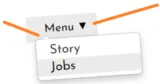
submenus

From the site menu editing window, it is now possible to no longer display the triangular submenu indicators, both in the main menu and/or in the drop-down submenus. No longer displaying these indicators can allow you to avoid cluttering the visual appearance of your menu (especially if you have several submenus) and/or to have submenus using a simpler style.

11/27/2023 - TOWeb version 12.01.963

  • Fixes in e-commerce sites during the payments stage which could appear blank and/or not displaying the payment buttons of PayPal Checkout V2
  • The deactivation of the new product search engine was not taken into account in real time in the "Topics" step (in TOWeb only, not on published websites)
  • The “Product not available for sale” option was no longer accessible in catalog products
  • Fixes in the calendar events edit window where the buttons to perform actions were not all visible
  • Small design mode icons could appear in blog or group type pages
  • Update of Pixel Facebook for the add-to-cart events on e-commerce sites

11/24/2023 - TOWeb version 12.00.961

Version 12 provides new features and major improvements to make TOWeb easier to use with more web capabilities to your website.
For more information see all the TOWeb 12 new features.

Former versions of TOWeb


For more information about former versions of TOWeb and how to reinstall them please check this page.


Page 3 of 10

TOWeb V11 updates

11/24/2023 - TOWeb version 11.10

  • The cookie banner was no longer generated when the personalization of cookies was first activated with the choice to force the user to accept/refuse them and thereafter deactivated
  • Fix in the function of adding a new paragraph at the start of the page in a catalog product (unauthorized action which could cause malfunctions)
  • The icon allowing duplication of a topic was grayed out and not usable for groups/blogs
  • Adding an element to Card or a Plan & Price objects was not working in certain circumstances
  • Fix for captcha images that may be missing when importing or restoring a site
  • New option allowing support for php sessions in Options > Security & HTML
  • Fix of two incorrect province codes for Canada

09/04/2023 - TOWeb version 11.09

  • Better compatibility and more security on web servers running PHP 7 & 8
  • Management of internal links in your pages has been optimized for better SEO of your site with Google
  • Detection of the existence of a new version of TOWeb no longer worked correctly when starting the software
  • The option "disable search engine indexing of this topic" could not work correctly especially for the internal pages and scripts of your site
  • The orange dot (the one indicating that a publication of the site is carried out in the background) remained permanently displayed afterwards when the publication of the site was canceled during the file generation phase
  • In the TOWeb support window, the "Search forum" button did not take into account the search text located next to it
  • The drop-down menu displayed when clicking on the "E-Commerce Options" button of a catalog topic did not use the same style as all the other drop-down menus of TOWeb and was not perfectly readable in certain configurations

07/11/2023 - TOWeb version 11.08

  • Support of YouTube Shorts videos. These videos being necessarily vertical (format 9:16), we advise you to integrate them in paragraphs with reduced width and an offset to center them in your page or to align several videos/paragraphs between them in order to obtain an optimal display of your content on all types of screens
  • 3 new predefined fields ( %TW-YEAR%, %TW-DATE% and %TW-DATEFULL% ) have been added to allow you to display the date of the last publication of your site
  • For all video objects supported by TOWeb (HTML5, Vimeo and YouTube videos) the predefined heights, previously expressed as a percentage, are now expressed in format 16:9 and 4:3 and their vertical format 9:16 and 3:4 have also been added
    Note: these changes have no impact on your already existing videos added with earlier versions of TOWeb and although not offered by default, percentage values can still be entered for their height such as 50% for a video 2 times less high than wide
  • Fixes of the TOWeb edit mode becoming impossible in all paragraphs of a topic after creating a new link in a paragraph text
  • Update of the TOWeb 11 documentation PDF file with the latest new features

06/15/2023 - TOWeb version 11.07

  • New toolbar in group/blog topics (appearing when hovering over each grouped topic) containing 4 buttons allowing you to :
    • duplicate a grouped topic (appearing automatically at the beginning of the list and created with the current date)
    • modify the date of a grouped topic as well as its keywords and its author
    • ungroup grouped topic
    • delete a grouped topic
These 4 actions are now also accessible via a right-click on a grouped topic
  • The maximum size of a web form file is now increased to 100 MB (instead of 2 MB in previous versions) and advice on file attachments in web forms has been added to the online help
  • Improved presentation of on/off switch buttons and alignment of their texts
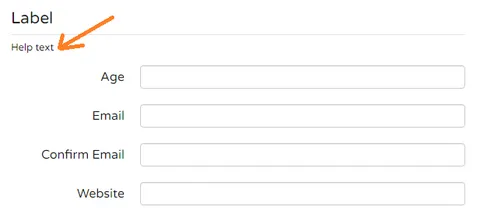
  • The help text of a form "Label" field is now displayed under its caption, thus allowing you to add a description or introduction to a section of your form (see illustration below)
example of section label of a web form

05/11/2023 - TOWeb version 11.06

  • Ability to instantly start a responsive blog topic like the one of the BusinessStarter template. To start your new Blog, click on "Add a new topic" then activate the option "A group / blog" and select "Blog 2"
  • Improvement of the responsive display of group/blog topics using several columns: depending on the width of the screen (and in particular when switching between landscape and portrait modes on smartphones & tablets) the display now automatically and gradually reduces the number of columns for optimal display
  • Fix for user user comment i-service that could no longer work on some web servers
  • Correction in the "Modify" menus of a paragraph whose first choices systematically appeared in English and not in the user interface language selected in the TOWeb options

05/03/2023 - TOWeb version 11.05

  • Ability to start a predefined blog topic like the one of the StoreStarter template. To start your new Blog, click on "Add a new topic" then activate the option "A group / blog" and select "Blog"
  • Support of the export & import of a group (such as a blog for instance) with all its topics
  • Fix for JamboPay and BNP online payments not working on servers using PHP 8.2
  • The "i-service blog" is now renamed "i-service user comments" in order not to cause confusion with blog topics
  • Correction of the "user comments" i-service which could no longer work on servers using PHP 8. If after completely republishing your site with this update you still get an "error 9" message on your site then perform a PHP support test from TOWeb to detect and correct remaining problems located on your web space
  • Leaftlet OpenStreetMap map display updates and fixes
  • Correction of the topic import feature which did not work when positioned on certain pages such as the shopping cart or the conditions of sale
  • If no "image object" is present in the 1st paragraph of the grouped page but a background image exists then it is this background image that will be used and display in the group index page

03/20/2023 - TOWeb version 11.04

  • New quick and easy possibility to promote certain products of your site to your contacts via Mailzy either immediately after a successful publication of your site, or at any time from the "Promote your products" button located in the "Publish > Notify your contacts" screen
  • In addition to French and English, the BackOffice of e-Commerce sites can now be displayed in Italian, Spanish, German or Portuguese depending on the language used by your web browser
  • Better support of certain characters entered in certain custom fields of an order form and which could lead to a malfunction of the shopping cart of e-Commerce sites
  • Correction in the data format (keywords and filters) of new blogs created using a group of topics which could lead to malfunctions in their display
  • Correction of the alignment of the subscription button to the mailing list of a site when the form was configured in horizontal layout and without consent of the user data
  • Correction of a shift and a double display of customer information in the list of orders located in the BackOffice of an e-Commerce site
  • Fix of the option "Apply discount only to shipping costs" which, when activated, was correctly saved but no longer reappearing as active in the coupon management window of an e-Commerce site
  • Minor adjustments to the alignment of labels and fields in the TOWeb interface

01/19/2023 - TOWeb version 11.03

  • When a page is duplicated and it belongs to a group, 4 duplication choices are now offered: "at the beginning of the group", "at the end of the group", "outside the group but in the site menu" or "outside the group and not in the site menu"
  • When adding a page to a group or an article, a new option "add to the beginning of the article / group" allows you to add it at the very beginning in order to facilitate blog creation with the most recent information always located first. Activated by default, you can deactivate it if you want to find the opposite creation behavior, i.e. adding to the end of the group or the article
  • It is now possible to add a reading time to a page so that it appears in a grouping page (displayed next to the date and/or author of the page if defined). This reading time (in minutes) is accessible from the "Keywords, author and date" button located among the "SEO optimization" properties of a section
  • New link "Share your coupon with your visitors by sending a promotional e-mail to maximize your income" in the coupon management of an E-Commerce site in order to create a newsletter with Mailzy when adding your new coupons
  • Filtering by selection of a keyword in a grouping page could make the introduction text of this page disappear as well as the content of its footer
  • Minor bug fixes in the generation of grouping pages and removal of unnecessary comments inside the source code
  • Optimizations of the code generated for meta tags of all web pages

12/13/2022 - TOWeb version 11.02

  •  Integration of our new Mailzy e-marketing service into your site from the "Publish > Notify your contacts" step to better manage subscriptions to allow you to manage your contact lists, automatically and free of charge, without the need for TOWeb's i-service mailing-list or PHP, in full compliance with the GDPR regulations in force (subscriptions, unsubscriptions, rejections, reports, ...). And of course also if you wish to use Mailzy to send your newsletters and boost your site's audience and revenue. 50 free sendings are offered the first time you connect to Mailzy !
  • Ability to center the prices and sub-product options (size, color, type) displayed in the index pages of the catalogs thanks to the new option "Center the price and sub-product choices in catalog index pages" located in "Options > e-Commerce > Cart > Options"
  • PHP support test improvements with better detection of limitations and configuration issues of some web servers & hostings
  • Google verification by "TXT record" added in "Options > Google Services". This new verification proposed by Google requires you to make a modification to the DNS of your host, which you should therefore contact to find out how to perform the TXT registration of your domain. Once done, select this option so that TOWeb's site optimizer does not report this point to you as missing
  • Improved dead link detection in TOWeb's site optimizer
  • The presentation text of a topic in a group could be truncated too short, especially when the text of the grouped topic was containing a link
  • Every ribbon used on the first paragraph image of a grouped topic is now also displayed in the group page like in the TOWeb's blog with ribbons indicating the number of the different TOWeb versions
  • Fixed various display issues of form submit button when a ReCaptcha was used (issues only in TOWeb design mode)
  • Some label form fields as well as list of radio buttons could not be hidden via an on/off button
  • The names of the TW-TOS and TW-PRIVACY predefined fields could be displayed instead of their content in error messages when using a confirmation field and validating a form 

12/02/2022 - TOWeb version 11.01

  • Fixed multiple issues causing blocking of validation and submission of forms with and without captcha
  • The on/off switch buttons did not hide form confirmation fields
  • Fixed a problem starting TOWeb Portable on USB key or removable disk
  • Changing the date of a paragraph no longer worked from the context menu

11/25/2022 - TOWeb version 11.00

Version 10 provides new features and major improvements to make TOWeb easier to use with more web capabilities to your website.
For more information see the TOWeb V11 new features.

Former versions of TOWeb

For more information about former versions of TOWeb and how to reinstall them please check this page.


Page 4 of 10

TOWeb V10 updates

10/20/2022 - TOWeb version 10.10

  • Update of the PayBox payment system in order to comply with the DSP2 standard for protection against fraud which came into effect on 10/15/2022. To update this payment on your site, you will need to delete it and then add it again using the latest TOWeb version
  • CSS size optimization on sites not using cookie consents
  • Some options or texts could appear truncated or shifted in the TOWeb interface especially when creating a new topic

09/06/2022 - TOWeb version 10.09

  • Warnings or errors could appear above the payment button when using PayBox. If this is your case, install this update then remove PayBox payment from your website and add it again by using this TOWeb update
  • Stripe update:  mandatory for all new Stripe accounts created after August 1, 2022 (but optional if you use an account create before). To use the latest version of Stripe on your site you will need to remove the old Stripe payment version of your site before to add the new one with this TOWeb update 
  • Some texts in the TOWeb interface were not readable or overlapped with others when the TOWeb window was of minimum width
  • When changing the image of an album, the selection of several images was wrongly authorized
  • Buttons displayed in some themes could appear with anomalies in the TOWeb "Topics" step

07/01/2022 - TOWeb version 10.08

  • The slogan element of your site's logo can now use a specific font different from that of the logo from your Theme's CSS editor
  • The CSS styles of a "menu link (active)" now also apply to submenu items. The styles of "menu link (active)" allow you to highlight the link/button of your site's menu in order to indicate to the visitor the current topic on which he/she is. But now, if you have for example in your menu a sub-menu X containing links to your 2 topics A and B, when opening either your page A or B, the button X will also be highlighted in the menu of your site
  • Bancontact payment is now supported for Stripe. If you want to use this latest Stripe update for TOWeb then remove the Stripe payment from your site and add it back again to your site
  • Loading root local theme was not disallowed and caused site CSS styles to be removed when used
  • The text appearing when hovering over the edit button of a text in a photo album was incorrect in TOWeb
  • New link added to the "License > New" screen for the new forum of TOWeb 

06/06/2022 - TOWeb version 10.07

  • Social sharing text could not appear in some sections using the "show sharing buttons only once at the end of the page" option
  • Password change on customer accounts was not working on some e-Commerce sites
  • The "Magnify" option that can be added to a parallax effect has been removed from TOWeb because it's no longer compatible with recent web browsers
  • Corrections in several labels in the user interface
    Improvements to the component for displaying web pages in TOWeb
  • Update of the libraries used in TOWeb to display and edit the content of web elements

07/02/2022 - TOWeb version 10.06

  • Customizing CSS styles for photo captions of albums was not working for albums using the "Open full size images from the index" option. Now, from the "Theme" CSS editor, the elements "Site > General > Photo albums > Picture > Caption" and "Site > General > Photo albums > Picture > Text" are supported to allow modifications of their display, for example to center the caption, change the colors or character size from the "Font" tab of these 2 elements
  • Implementation of a system allowing the automatic update of the CA certificates used by the Stripe payment method
  • Fixes for survey malfunctions (especially compared to PHP 8) as well as 2 improvements
    - addition of a new link "Reset all the votes of this poll" allowing you to delete the data file of the votes of the selected poll from your web space
    - slight visual improvements to the display of voting results (addition of margins, slightly rounded border and slightly raised percentage value for better readability when the background color is dark)
  • A file overwrite confirmation is now systematically requested when a paragraph is exported in ".twp" format and the destination file already exists
  • Fix in the interface of the customization window of the <head> section (located in "Options > Security & HTML") where the option relating to the additional line of code did not remain positioned at the bottom of the window when a resizing of its height but is displayed above the text area

01/13/2022 - TOWeb version 10.05

  • The pagination of the different products of a catalog placed was not working correctly when placed on the home page of a site
  • Links to digital files purchased by customers are now displayed and downloadable from the order history of their customer accounts
  • The "status" of orders displayed in the backoffice page could incorrectly display "Awaiting payment" instead of "Payment accepted" on some paid orders especially with PayPal and Stripe
  • Links of some download files could not appear in the Back-office
  • In some cases, the return page to the merchant site could remain blank after a payment accepted by Stripe
  • Removal of an empty duplicate H1 tag that can be generated in the HTML code of product catalogs
  • Correction of a malfunction of the "drop-down list" custom fields that can be added to the order form of an e-Commerce site which displayed "undefined" values
  • Correction of typos in the English texts of the predefined delivery messages of downloadable files for sale and addition of these missing texts in the following languages: Italian, Spanish, German and Portuguese
  • Modification of the Facekook Pixel code so that certain analysis tools no longer incorrectly report errors/warnings
  • Correction of a text present in Spanish in the Italian interface of TOWeb

12/22/2021 - TOWeb version 10.04

  • Under certain conditions and certain configurations, orders from an e-Commerce site could be without customer contact details
  • Some captions of the civility field (in particular "Miss" in an English website) could not be displayed in the forms of the customer accounts
  • On some servers, after a successful payment by Stripe, the return page to the merchant site was not display correctly but with a blank page instead
  • When creating a customer account, the states / provinces field of a country could appear when it should not on websites using the onTOWebPageLoaded function inside a script for example to display an alert or a snow effect
  • A "Warning" line could appear in the customer accounts page on e-Commerce sites using individual coupons and when no individual coupon was defined

12/15/2021 - TOWeb version 10.03

  • The width of images in product pages can now be changed. By default in "auto" mode at 50% of the page width, this can now vary between "xsmall" and "xlarge". The change of this width also applies to all other products of the catalog
  • The photos could appear as being blurry on certain sites and/or certain computers
  • The selected sub-product photo was incorrect in step 1 of the shopping cart
  • On smartphones or tablets, the content of the first paragraph of a page might not display correctly across the full width when the full height option as well as a background image were used
  • Automation after digital product purchase could not work with PayPal test mode
  • Paragraph identifiers could be used in some internal links instead of bookmark names when the latter were defined
  • In an e-commerce site only accepting customers from the same country, the country indicated by default in the customer account creation form could sometimes be the one of the United States instead of the store country
  • It was no longer possible to activate the BCC option for customer order submission. Please note that it is possible that this BCC feature is not accepted and does not work correctly on your web server. If so please reuse the recommended default option.

12/03/2021 - TOWeb version 10.02

  • The predefined texts concerning customer accounts can now be personalized from the "Options > Languages > Translate predefined texts > Accounts receivable" screen
  • The checkout process could get stuck in step 2 on some e-commerce sites
  • An ERR_SNE error could be incorrectly reported after validation of an order placed on some e-commerce sites
  • The creation of a customer account could not work in some cases
  • The pad color of sub-products in "white" was not visible on pages using a white background as well as the texts of some sub-product buttons  depending on the colors used by the theme of the site
  • The pad colors of the sub-products were not displayed correctly when numerous and the name of the internal codes of the colors were displayed in the name of the products on the Back-Office real-time stock page
  • In product catalogs not using the shopping cart, product sheets could have the product name displayed twice
  • In a local preview of a site (and only in this case) certain predefined texts could appear systematically in French and not in the language of the site

11/29/2021 - TOWeb version 10.01

  • The theme slider was not working correctly in certain modes and in particular when use with links
  • The payment buttons of e-Commerce sites were no longer displayed but an endless animation instead
  • The real-time stock Back-Office page could no longer display anything when this option was activated on an e-Commerce site

11/26/2021 - TOWeb version 10.00

Version 10 provides new features and major improvements to make TOWeb easier to use with more web capabilities to your website.
For more information see the TOWeb V10 new features.

Former versions of TOWeb

For more information about former versions of TOWeb and how to reinstall them please check this page.


Page 5 of 10

TOWeb V9 updates

09/06/2021 - TOWeb version 9.09

  • Better support for Leaflet maps in terms of zoom and street name readability
  • In multilingual e-commerce sites, some product pages could be missing in certain languages or not using the correct language
  • New option located in "Options > Back-Office > Online stock > No real-time stock for sub-products" allowing to take into account only the products not having any sub-products in the management of the online stock
  • The sitemap file of a multilingual site could sometimes contain errors and image data even though the option to generate images was disabled
  • Display fixes of the stars and user comments form not appearing correctly in pages
  • The PayPal payment button not appear centered when checking out on some e-commerce sites
 IMPORTANT: when starting TOWeb make sure that the version number displayed is 9.0.9.911. If this is not the case but the number 9.0.9.910 instead then download TOWeb again and install it again in order to have the correct fixes in full, including also the user comments fixes.

07/01/2021 - TOWeb version 9.08

  • It is now possible to create a single page site using a photo album
  • Possibility to customize the CSS styles the index buttons of the index pages of the product catalogs (which previously were always blue)
  • New predefined field %TW-PAGELANG% to use page language inside scripts of a multilingual website
  • Possibility to customize the CSS styles of disabled/inactive buttons that can sometimes be used in a site, in particular e-Commerce
  • In the e-Commerce BackOffice, certain orders could sometimes appear with no "Status" indicated and without the possibility of modifying them
  • In a multilingual site, changing the language of a product page did not display the product page in the selected language but the catalog index page in which the product was located
  • Improvement of the user comments display and clarification of certain labels used in the TOWeb interface

05/26/2021 - TOWeb version 9.07

  • In paid editions of TOWeb 9, the slider of the Theme is no longer limited to 50 images (only the free edition of TOWeb V9 remains limited to a maximum of 50 images)
  • The cookie consent dialog could be displayed each time on each page when using the option "Force the user to accept or refuse cookies before visiting your site"
  • The customizable logo of the order form did not appear when printing orders of e-Commerce websites
  • Some online payment orders (such as PayPal for instance) could have used and displayed by default the status "Payment validated" instead of "Pending payment" in the Backoffice
  • The "Encode password" option located in step 2 of the host configuration wizard (accessible from the Publish step or by using the F8 key) could not be activated. You can now use this option if the connection to your FTP server does not work and your password contains special symbols or characters

02/04/2021 - TOWeb version 9.06

  • The new function to display a paragraph's content aside its background image was sometimes not using all the available width
  • Due to a change of Leaflet Open Street Maps, the maps were only displayed as an empty gray area
  • When the WebP format option was enabled, Images placed in the slider of the Theme could not be displayed to the full width or height available. Furthermore some web browsers, such as Safari, not fully supporting WebP are now taking into account to display images. 
  • Voting in polls could no longer work
  • The reset of file download counters from the backoffice no longer worked 
  • Update of VAT rates and sales taxes in the United Kingdom also removed from the EEC zone due to Brexit which came into force on January 1. Please note that this update will only concerns the new sites you will create but it is not retroactive to your existing sites. If Great Britain is among your countries of sale and if Brexit affects you, then you will need to adjust by yourself the applicable VAT rates in your country of sale from  "Options > e-Commerce > Taxes"
  • Minor corrections of the Backoffice, in particular the real-time stock page which could always remain displayed in French
  • HTML and CSS code optimization of the QR code printing page

12/17/2020 - TOWeb version 9.05

  • Open Graph metadata are now enabled by default in all topics of your site and include "twitter card" information. So without doing anything other than installing 9.05 and republishing a site with a favicon, you will have your "twitter card" integrated into your pages as well as your product sheets. Furthermore, if an Open Graph metadata image has a width / height ratio greater than 1.3 (i.e. landscape photo) then its twitter card will be generated in landscape mode with its large photo in this format and its information placed below (otherwise the image will be displayed in normal mode, i.e. with a smaller squared image aligned to the left and its information aside on the right)
  • The PHP support test performed by TOWeb now checks the PHP version used by the web server that hosts your site in order to notify you in red of any problems related to your version
  • Changing the "thumbnails style" of an album from the "Theme" step (Site > General > Photo albums > Thumbnail) was no longer taken into account. In addition, a new "ginette" style has been added taking up the one used by the new V9 template of the same name
  • Duplicate text displayed when using one of the new possible layouts available and applicable to the catalog index pages
  • Some Backoffice pages may not display accented characters correctly
  • Access to the "Publish" step of TOWeb could sometimes be abnormally slowed down
  • Some types of links to external sites could be truncated
  • Changing the language of the TOWeb user interface could not work but remain in French and require a double change of language in order to be taken into account
  • Modification of the initial comment present by default when creating an HTML script in order to avoid adding source code inside the comment and so as comment

12/10/2020 - TOWeb version 9.04

  • Pre-defined texts are now available for your site if you have enabled consent and cookie personalization. Directly usable in your site without the need to do anything, they are also available in 12 different languages if your site is multilingual. To view or modify them, click on the "+" button next to the cookies you have activated on the "Options > Cookies & Confidentiality > Cookies" screen. If you have modified a text related to a cookie but wish to start again from the one proposed by TOWeb, simply click on its "Default value" button
  • Activating the "Disable right-click" content protection on a site caused blank pages when using the "Save as PDF" feature. If you still obtain blank pages, make sure that the scripts and HTML code you have added to your site are compatible with printing/pdf saving (iframe, etc.)
  • Some web browsers such as Firefox could not offer an extension to image files when using the click function to download them
  • Backoffice access issues
  • It is no longer necessary to click on the red button to save the changes after a publication of the site but automatically done
  • A parasite alert appeared when displaying superimposed topics in a site using cookie consent
  • The alignment (left/centered/right/justified) of a title or a subtitle in a topic could sometimes not be taken into account when saved

12/08/2020 - TOWeb version 9.03

  • Correction of a crash that could occur systematically or randomly on certain configurations and particularly when creating a new section
  • Removing of cookie consent buttons added at the end of a topic when placed in an overlay window
  • Correction in the technical support contact form in order to be fully usable by certain types of foreign keyboards

12/07/2020 - TOWeb version 9.02

  • Access to the Backoffice could no longer work and display a blank page
  • The new "click" action to "Download" the image directly in large format did not work correctly
  • User comments could no longer load correctly
  • A label "new!" was present in TOWeb interface (for photo albums) where no new features was present

12/06/2020 - TOWeb version 9.01

  • Clicking on photos in albums was no longer opening them in full screen when the "open large images from index" option was enabled. This option is also now enabled by default when creating a new site
  • The images of products placed in the index pages of catalogs are no longer updated by default in "large size" in order to preserve compatibility with existing sites and avoid having to deactivate this option on each catalog
  • The shopping cart, local search engine and sales conditions pages were not containing any introductory image when displaying the display by "Topic" was selected in the "Slider" of the "Theme" step
  • i-services and site Backoffice malfunctions displaying errors or blank pages on certain server depending on the PHP vesion used
  • under Windows 7/8, a random crash of the application when activating the "Theme" and "Topics" step
  • The "Apply changes" and "Cancel" buttons located in the catalogs and albums reorganization screen of TOWeb were not working
  • Existing version 8 sites on the computer may not appear in the list of old sites from "File > Open" and require the use of a version 8 site backup via the "File > Restore" function

12/04/2020 - TOWeb version 9.00

Version 9 provides new features and major improvements to make TOWeb easier to use with more web capabilities to your website.
For more information see the TOWeb V9 new features.

Former versions of TOWeb

For more information about former versions of TOWeb and how to reinstall them please check this page.


Page 6 of 10

TOWeb V8 updates

10/15/2020 - TOWeb version 8.13

  • Update of the online payment method Ingenico (alias Ogone) which could no longer function correctly. If you used this payment on your site you will have to delete it and then add it again manually with version 8.13 in order to update it
  • The Poll object was no longer working correctly when the option to display poll results was not used
  • Correction of a security flaw in a script allowing registration to a site's mailing list
  • Removal of unnecessary questions that may be asked when deleting a site from its web space
  • Modification of some backoffice pages where accented characters could be displayed incorrectly
  • Irish language (Gaeilge) not appearing in the language menu of a multilingual website
  • Under MacOS X only, the Free edition of TOWeb could not publish a site if no user email address was previously entered
  • The two dates "Last modified" and "Last saved" located in "File> Your website" were not always visible depending on the width of the TOWeb window

08/20/2020 - TOWeb version 8.12

  • The option allowing the shutdown of the computer after a successful publication of the site can now be activated and deactivated also when the transfer is in progress (under MacOS X this option does shutdown the computer but only the TOWeb application)
  • The fact of not entering filenames for the pages of catalog products could lead to a mixture of languages and product pages on a multilingual site
  • The confirmation link sent by email for a mailing list subscription was not working correctly in some email reader tools
  • The mailing list subscription form could appear incomplete when placed inside an information panel
  • CSS optimizations

07/04/2020 - TOWeb version 8.11

  • Site form security has been tightened to avoid certain malicious script attacks
  • Correction the e-Commerce BackOffice to update real-time stock that could cause a “reset” and a loss of the product quantities entered
  • The option "Use your additional code in design mode" located in "Options > Security & HTML > HEAD" was not working correctly when deactivated, with the consequences of executing user scripts in design mode and slow down the TOWeb editor and/or display warning messages
  • The unsubscribe link automatically added to the end of the email sent by the “Notify your contacts” function is now shorter in order to avoid problems with links being cut or considered invalid by certain e-mail readers. In addition, it now becomes possible not to send any unsubscribe link by just leaving the "unsubscribe link" field empty in “Options> i-Services> Mailing list> Configure> Unsubscribe link”
  • The "zoom" hover of a photo is now disabled for mobile devices as it was impossible to scroll the page when the finger was positioned on the photo
  • When the "real-time stock" option is deactivated, the "default" behavior for displaying the Stock of all the subproducts of a product can now be customized to display "In stock" (initial behavior) or to the desired replenishment status (such as "Available within 15 days") by selecting "0" from its produtc "Stock" option
  • Theme preview of TOWeb was not systematically refreshed after adding an image in the Slider of Theme
  • Fix of the slide indicators that were requiring to activate first the navigation buttons of the Theme's Slider to appear
  • It is no longer possible to change the bookmark name of a paragraph when hidden as it is useless but also avoids integration problems of the alert script
  • The names of the topics marked as being "under construction" are no longer present inside the drop-down list of an "article" topic 
  • For the “article” type topics, on the label of the drop-down list navigation now puts the focus on the
  • Notifications of orders from an e-Commerce site are no longer sent by email when used in demo mode in TOWeb Free or Premium edition and an error message “ERR_DEMO” now appears to remind you that the site online is working in Demo mode
  • Addition of a green label “New!” inside the "Options > Smartphones" screen of TOWeb to more easily locate the new option for smartphones introduced in version 8.09

05/06/2020 - TOWeb version 8.10

  • A new option (activated by default) allows you to modify the responsive display behavior of images and other objects embedded in the text of your paragraphs to make them more readable on smartphones and tablets
  • From the CSS editor, it now becomes possible to hide the Slider of your Theme only on smartphones
  • New types of scripts now supported allowing the display customizable alerts and popup windows on your site
  • The local search engine of a site with product catalogs was only displaying results when searching for main product references but not subproduct references
  • Sites created with a version 7 or earlier of TOWeb and containing sub-products displayed with a restocking period (such as “Available in 15 days”) could, once imported into TOWeb V8, no longer display the same status but “In stock” instead. No action is required to keep your sites functioning as before, except verifying that you have deactivated the real-time stock option from “Options > E-Commerce > Stock”
  • Deletion of empty areas which can be left on the HTML code when using paragraphs set to the "Not published" mode
  • In the CSS editor of the Theme, the customization of certain links (such as the color of hovered links used inside paragraphs such as “Custom 1” to “Custom 5”) was not always taken into account
  • The option introduced in version 8.09 allowing a sound at the end of each publication was displayed even when no hosting was configured
  • Minor CSS optimisations

04/14/2020 - TOWeb version 8.09

  • In the “Publish” step, a new option now makes it possible to play a sound of 3 beeps to signal that the end of each successful publication
  • Fix of a problem with TOWeb Portable which could no longer work on Windows
  • Update of the TOWeb Poll i-service which now becomes incompatible with the very old version 4 of PHP but now requires at least a version 5 or 7 of PHP
  • Adding additional lines of CSS code (declared using the <style> and </style> tags) is now authorized in the <head> section of each topics (accessible from their SEO options) as well as globally for all the pages of your site (accessible from“ Options > Security & HTML > HEAD”). All your possible local or global CSS additions will be combined in a single <style> declaration

03/11/2020 - TOWeb version 8.08

  • Improvement of the code generation allowing to reduce up to 45% of the size of the CSS files to accelerate the download and display of a site
  • New “Opacity” effect available for the “Hover” property of an “Image” object. Use this effect if you want your image to be displayed by default with opacity and then appear clearly (without any opacity) when hovered with the mouse
  • New “Color” effect available for the “Hover” property of an “Image” object. Use this effect if you want your image to be displayed by default in black & white and then appear normally with all its colors when hovered with the mouse. Note: this effect does not work with old versions of Internet Explorer/Edge before 2015 but only from version 13 of Microsoft's browser
  • New “Opacity” property applicable to any CSS element from the “Advanced” tab of the Theme editor. Modifying this property is particularly useful on an element having a possibility of hovering (such as a link, a button or an image of an index images of an album or catalog), if you want to chnage the appearance of your element on mouse over. The possible values are between 0 and 1 (examples: 0.1 = very little visible, 0.7 = average opacity, 1 = no opacity, normal display)
  • New “Filtering” property applicable to any CSS element from the “Advanced” tab of the Theme editor allowing an element to be displayed in “Black & white”. Modifying this property is particularly useful on an element having a hover option (such as a link, a button or the index images of an album or catalog), to make the element appear initially in “Black & white” and therafter in color on mouse over by deactivating this effect. Note: this effect does not work with old versions of Internet Explorer/Edge before 2015 and Edge web browsers but only from version 13 of Microsoft's browser
  • Fix for the “drop-shadow” border effect applicable to the image of a paragraph that could have been truncated on the right or left side depending on the alignment chosen
  • The Bluepaid online payment method is no longer supported in TOWeb due to a judicial liquidation procedure of the company Bluepaid Invest occurred in February 2020
  • New texts and links inside the TOWeb user interface pointing to the new TOWeb Affiliate Program

01/15/2020 - TOWeb version 8.07

  • Multiples fixes related to the custom <head> management of catalog products
  • Alignment and display fixes of some social sharing buttons
  • In the CSS editor of the “Theme” step, the new properties “Menu link (hover)” and “Submenu link (hover)” have been added to the “Language” menu element of a multilingual website in order to allow the change of these styles (like for instance the text color and background color) to better match the ones of your theme
  • The cookie consent banner could be displayed with inverted colors on certain sites (like white or transparent background instead of black)
  • Update of the SYSTEMPAY payment method systematically working in SHA-1 mode even when its SHA-256 option was activated. If you already using this payment on your site, you will have to delete it and recreate it manually with a version 8.07 to update it
  • In the edit window of a Table object, the delete button located on the right was deleting a column instead of the current row selected
  • The protection of a topic was not working correctly when the "No footer" option was activated
  • Update of the i-service form of TOWeb V8 which was no longer compatible with the old versions 4 of PHP

11/05/2019 - TOWeb version 8.05

  • Improved OpenGraph data management with now automatic generation of image width and height for more efficient processing and optimal display of your images during sharing. Images larger than 1024 pixels are also now considered for optimal computer display. Note: for Facebook the recommended image size is either a square format (ratio 1: 1) or a rectangular format (ratio 1.91: 1) as for example 600 x 314 pixels, 1200 x 628 pixels or 1400 x 733 pixels
  • Enhancing the security of some third-party scripting embedded in web pages with SRI (Subresource Integrity)
  • Some characters/symbols placed in image titles could be badly encoded and cause reading problems on the sitemap file of the site photos
  • The local search engine could have displayed text of paragraphs using the "Hidden" display option

11/21/2019 - TOWeb version 8.06

  • Ability to add an animation effect of snowflakes that fall into the content of the pages of your site
  • The two new "sponsored" and "ugc" link attributes introduced by Google last September are now supported and be set from the "Relation (rel)" list when creating or editing a link
  • Unnecessary parameters added to the links pointing to product catalogs and album listings are now no longer generated

10/17/2019 - TOWeb version 8.04

  • Code optimization of some styles (minification)
  • Manually added images for the Open Graph metadata were resized to a small size in catalogs and albums
  • Orders containing a product with at least one double quotation mark in its name could have been partially displayed thereafter in the Back Office
  • The calculation of VAT was wrong when VAT was used in the delivery modes of an e-Commerce site
  • In a multilingual site, the "Edit" button located in the properties of an table object was only allowing the change of the main language cells but not those of the secondary languages
  • The default texts entered in fields of type "Multiline text" were not displayed in forms
  • TOWeb interface fix of the "save changes" button that was not always appearing after certain modifications in the " Options > Errors & Rules" screen
  • An unwanted "New" label could appear in the TOWeb interface near the image properties of an album

10/01/2019 - TOWeb version 8.03

  • Images added to the Open Graph metadata of a topic were resized to a small size
  • In the Free edition of TOWeb (only), after an attempt to publish a site larger than the maximum authorized limit of 50Mo, TOWeb could "crash" when opening both the "Topics" or "Theme" screens
  • The host configuration wizard could remain blocked indefinitely trying to establish a connection in vain when a web address (htpp or https) was mistakenly entered by the user in the "login" field FTP connection
  • In the TOWeb technical support wizard, some links displayed inside the results of a search in the online help were not opened correctly in web browsers
  • A context menu has beeen added to the edit field of the <head> section of a topic to facilitate text selection and allow copy / paste / cut actions
  • On the e-Commerce Back-Office page of the Stock, the use of the "Reset" button now displays an explanatory message and ask for the confirmation of this action

09/23/2019 - TOWeb version 8.02

  • Wrong size of the pictures displayed on albums using both the options "open full size images from the index" and "medium" tumbnails size for their index pages
  • The product quantity added to the shopping cart was not taking into account the real-time quantity in stock when the shopping cart option "Allow the purchase of products greater than those available in stock" was deactivated
  • Fix of a security vulnerability in forms using ReCaptcha
  • Google Recaptcha texts were displayed in the same language as the web browser and not in the language of the website

09/18/2019 - TOWeb version 8.01

  • New choice of "medium" speed for the slider function of an image object containg several images
  • The quantities in stock were displayed in the product pages and in the shopping cart even when the option was deactivated
  • The "filter" function was not working properly on the Stock page of the e-Commerce Back-office
  • Free shipping defined from a certain amount, weight, or quantity was causing an undeliverable shopping cart error
  • The local search engine was no working at all on some websites
  • The Facebook "Like" and "Share" buttons where reversed (ie. activating a Facebook "like" was displaying a "Share" button and conversely activating a " Share" button displayed a "Like" button). If you used the previous version 8.00 and modified the choice of these options, you will need to restore them
  • Facebook's "Share" button may have not worked correctly when used on the homepage of some sites
  • "Public key" label replaced with "Site key" (correct Google terminology for the ReCaptcha public key) in TOWeb's captcha configuration window

09/10/2019 - TOWeb version 8.00

Version 8 provides new features and major improvements to make TOWeb easier to use with more web capabilities to your website.
For more information see the TOWeb V8 new features.

Former versions of TOWeb


For more information about former versions of TOWeb and how to reinstall them please check this page.


Page 7 of 10

TOWeb V7 updates

10/18/2019 - TOWeb version 7.24

  • Download links to image files (png, jpg, gif, ...) was not working correctly when the i-service downloads was enabled
  • TOWeb's site optimizer fix of links erroneously reported as dead for Twitter URLs
  • The colors defined at the level of the Keys and Fiches objects was not be correctly re-selected with their good values in the TOWeb interface
  • Corrective at the level of Croatia and Greece that could not be included by default as a member of the European Union in some e-Commerce site
  • Multiple minor user interface fixes (update of some incorrect labels and/or translations, controls not correctl aligned, ...)

06/24/2019 - TOWeb version 7.23

  • As the lines of code added in the section <HEAD> of all the pages of your web site could lead to slowing down or even causing errors in TOWeb, they are not anymore taken into account by default in TOWeb design mode. In case of specific need, you can activate them with the new option "Use your additional code in design mode (not recommended as it may cause errors in TOWeb)" located in "Options > Security & HTML> HEAD"
  • Due to the shutdown of Google+, TOWeb no longer generates scripts for this services in your topics and no longer offers it in the UI
  • According to some CSS styles defined in the site theme, LinkedIn share buttons could be partially displayed and truncated
  • The export & import pop-up submenus of products are no longer available when a catalog does not have its "Price" option enabled. These functions, especially the export, are planned and useful for the affiliation and communicate to third parties an up-to-date list of all your products and their prices in a file in XML or CSV format. Nevertheless, if for some reasons you want to use them, you will need to temporarily activate & deactivate the price option of your catalog

05/24/2019 - TOWeb version 7.22

  • The links/buttons, previously mandatory inside a Plan & Price object, can now be deleted when not needed
  • Due to the changes to the free use of Google Maps in a website and their non-display consequences (including in local previews), the free maps of Leaflet are now systematically proposed by default everywhere in TOWeb (when creating a new site or adding a new paragraph or a new page)
  • The file names of the web pages (especially those of catalogs) could appear to be displayed in red in TOWeb and thus to indicate wrongly that they were not taken into account or that there was a problem in names given by the user
  • When editing the text of an album image page, the use of the left & right arrow keys on the keyboard was not moving the cursor inside the text but instead was changing page to the previous & next image of the album. Moving from a photo to another now still remains usable with arrow keys except when the title/text of the photo is being edited
  • The delete/link button was not always appearing in the user interface of a Card objet
  • Update of the host configuration wizard in order to take into account the TOWeb predefined hosting servers when they support or impose some security options (FTPS or SFTP, SSL for HTTPS site, …)

04/30/2019 - TOWeb version 7.21

  • In some situations, features of the Theme Slider was not working like in TOWeb and/or in the site like for instance when trying to delete its last remaining image, when saving the images' titles of a secondary language or changing images position in the list

04/18/2019 - TOWeb version 7.20

  • A new “configure” button has been added next to the topic option “Allow the folding/unfolding of paragraphs” in order to change the behavior to “Automatically fold all paragraphs except the last unfolded” or “Allow the folding/unfolding of paragraphs”
  • Improvement of the Twitter object in TOWeb which, in addition to supporting the Twitter Timeline Widget, now also allows to integrate a simple Tweet by entering the address of the tweet link
  • The “No footer” option of a topic is no longer linked to the “No navigation” option and can therefore be deactivated/activated independently
  • Improvement of the TOWeb user interface display where some buttons may not be accessible or visible on screens with low resolutions
  • The titles and texts entered at the slider of a Theme were not taken into account for the multilingual sites
  • HTML tags <br> could appear in plain text instead of carriage return characters when entering newlines in a “confirmation” form field message (such as the one used to accept your privacy policy).
  • Some TOWeb i-services were not working correctly on web server using a PHP version 7.2 or greater
  • Added spacing between some social buttons that could touch each other

01/28/2019 - TOWeb version 7.19

  • From the CSS editor located in the Theme step, when customizing the "Search box" of the site, a new "Search button" option can now be activated to add a search button. Different choices of presentations are offered for this button to customize its color, size and shadow
  • From the related products window it is now possible to select one of the 4 subtitle styles defined in the theme in order to have a different display of their introducing text "You may also like..."
  • In order to facilitate the editing of related products in the "Topics" step, a "Related products" option has been added to the "e-Commerce options" drop-down menu of a catalog and an "Edit" button is also now appearing when the mouse is over of the introduction text of related products
  • If you use external URLs of other websites inside your website menu, you now have the choice to deactivate or activate the option “Open external website URLs in another tab of Web browsers”. Deactivating this option can be useful in some cases, especially when some pages of your site are built with a another solution than TOWeb (like for example a forum installed on your web space)
  • The placeholder text inside the search field of a site was not always using its customized text and/or the correct language in a multilingual site
  • Changing the meta <title> and <description> tags of a catalog product (or album page) was not showing the “Save” red button
  • The use of the option “Under construction” on every topics of a site is no longer possible because at least one page (the home page of your site) is mandatory for a site to be published

12/13/2018 - TOWeb version 7.18

  • Among the properties of the first paragraph of each catalog product, it now becomes possible to enter <title> and <description> meta tags as well as a custom filename of each product page.
    IMPORTANT: If you have pages already published on the Internet then, before making any changes to their file names, you should remember to update their permanent redirect in your .htaccess file in order to avoid dead links harmful to the SEO of your site
  • Like the catalog products, it is now also possible to enter the <title> and <description> tags of each photo page of an album as well as entering each filenames of these photo pages (only applicable to albums not using the "Open full size images from the index" option)
  • Adding the same animated GIF image to multiple places in a site could cause the lost of its animation
  • Customizing the link text color of paragraph styles from Custom1 to Custom2 could have been ignored
  • In the payment configuration window, the display of the IPN address of certain online payments could have appeared starting with HTTP instead of HTTPS on secured website
  • BluePaid payment improvement of the previous version 7.17 could have cause errors and will need to be recreated using this new version 7.18. If you previously added BluePaid on your site then please see how to update your payment

11/15/2018 - TOWeb version 7.17

  • A new Rating object to display one or several reviews using rating stars
  • The Key figure object can now be displayed with icons (predefined or your images) by selecting the “Icons” style instead of the previous “Horseshoe” presentation
  • Support of the new version of the Twitter Widget
  • In addition to the px, em and % units of measure that can be entered in the Theme's CSS editor, it is now possible to use the viewport units vw, vh, vmin and vmax which depend on the dimensions of the web browser window (1vw = 1% of the window width, 1vh = 1% of the window height, 1vmin = the smallest value between 1vw or 1vh, 1vmax = the highest value between 1vw or 1vh)
  • Support of return pages and payment confirmation URL (IPN) of the BluePaid online payment system. If you were previously using BluePaid on your site then please see how to update your payment
  • Improved alignment and centering of a newsletter object in the page (mailing list form)
  • In a multilingual site, the labels of Key figures objects were only displaying the latest changes disregarding the site language

10/25/2018 - TOWeb version 7.16

  • With a Key figure object, it is now possible :
    • to animate its first display (increase of its value) by indicating the duration of its animation
    • to add a unit symbol (such as for instance %, °C, °F, km, …) next to each value
  • The animation of a Chart object does no longer start immediately once the page is loaded but upon the first appearance of the Chart
  • When several topics have secure access through custom user accounts, adding a new user automatically was always giving this person by default the same access to all other protected topics of your site too. But now, when adding a new user from a protected topic, a confirmation request is required. By answering YES, the operation will be the same as before, but by answering NO, the access authorization of the new user will only be applied to the current topic and not to the others. Note: If you have protected topics with the “All user accounts” option enabled then no confirmation will be requested but your new users will automatically be added to those topics
  • Improvement of the paragraph import from the "add a new paragraph" function in order to directly browse for a TWP file as soon as the option "Import a TOWeb paragraph file" is selected
  • From a catalog product, it was possible to enter negative values for the stock quantity of sub-products
  • Optimizations of generated source code especially for Chart objects

09/28/2018 - TOWeb version 7.15

  • The latitude and longitude verification of Leaflet maps systematically indicated an error on systems using a "." as decimal separator in the format of numbers
  • The click on the thumbnails of multiple images could no longer work when a zoom effect on hover was applied the images display
  • In some situations, the ribbons over the images were not displayed correctly inside TOWeb  (problem occurring only in TOWeb editing mode but not on the published sites)

09/26/2018 - TOWeb version 7.14

  • Ability to have collapsed paragraphs in a page that can be fold or unfold by simply clicking on their title
  • Support for Leaflet maps as a free alternative to GoogleMaps (often problematic)
  • When creating a new map (inside a paragraph or during the creation of a topic template "Map" or "Contact"), it is now using Leaflet OpenStreetMap by default instead of Google Maps
  • Change of the first choice when creating a new page in order to have paragraphs using full page width by default 

09/12/2018 - TOWeb version 7.13

  • In some paragraphs, images may no longer be displayed with the right dimensions or proportions
  • The option to display large images from the index page of an album was not correctly displaying the images in full screen mode
  • New update for the PayPal payment. If you have downloadable digital file for sale on your e-commerce site and use PayPal then (and only then) we advise you to install the version 7.13 (or higher) and update this payment 

09/10/2018 - TOWeb version 7.12

  • In addition to the 3 main choices for displaying a paragraph (Visible, Not published, Hidden) you can now choose a paragraph effect (slide, zoom, flip, ...) to make it appear with a short animation during its first appearance. Paragraph animations in a topic can be played once or systematically. All of these animations can also be disabled on your site for visitors using a smartphone
  • In a paragraph using a background image, a new “Blur” option can now apply a blur effect to better highlight the text of the paragraph in the foreground. Note: This feature is not supported by old versions of Microsoft browsers but requires MS Edge version 13 of November 2015 or later
  • In a web form, it is now possible to add a field of type “Date range” to allow the selection of a start date and an end date in the calendar
  • Improved navigation during the selection and preview of a new theme as well as during the creation of a new site: the return to the main list displaying all the templates is no longer systematically going at the beginning of the list of models but stays at the position where we were before the selection. Futhermore, when loading the templates page, a message and an animation are now displayed to invite the user to wait, and if after 30 seconds the download is still not finished, a second help message appears inviting the user to check his/her internet connection and to make sure that TOWeb is not blocked
  • For users with forward & backward buttons on their mouse, it is now possible to use them in TOWeb to make it easier to navigate and return to the topics you previously edited
  • A new "Encode password" option has been added in step 2 of the Host Configuration Wizard. If your password contains accents or special characters and you are unable to log in, then enable or disable this option
  • A new option “Autocomplete off” can now be applied to a form field to deactivate the automatic input of web browsers
  • The links contained in the local menu of a topic were not working with some web browsers
  • Optimization of generated code in design mode for faster loading of topics in TOWeb
  • Improvements in the delayed display of images (lazy loading) with a better W3C compliance
  • Some TOWeb functions could create temporary files not deleted after use

08/08/2018 - TOWeb version 7.11

  • The option to indicate that your site uses an SSL certificate is now also available from the "Options > Security & HTML" screen where it is also possible to specify the expiry date of your certificate (detected by TOWeb). If you have already enabled the SSL option on your site, you will need to perform an SSL test and/or manually enter the expiration date of your SSL certificate.
  • Increased security by SRI of the resources used by a site. SRI is a recommended W3C specification to ensure that third-party resources have not been tampered with and prevent an attacker to include malicious content
  • The “noopener” attribute is now automatically added to all links that are opened in a tab or new browser window (target=“_blank”) to correct a possible security vulnerability
  • In the “Publish” step, a new option is now available to prevent the publication of a website when too many optimizations have been detected
  • In the “Publish > Site Optimizer” screen, a new option has been added in order not to count advice displayed in orange as issues or optimizations of great importance
  • Support for strengthening the security of certain payments by the possibility of using the SHA-256 algorithm for signatures from the "Mode" tab of the TOWeb payment window. This concerns the following online payments: PayZen, SystemPay and Sogecommerce. If you already use one of these payments on your site with a previous version of TOWeb then please see how to update your payment
  • Site Optimizer now displays site security advice (SSL/HTTPS) and allows you to set a reminder before the expiration date of your SSL certificate
  • In the Site Optimizer, links to download files could have been reported as dead links if files were large
  • Site Optimizer was not always detecting the absence of some ALT text on the images of a multilingual site
  • Topic filtering options of the site optimizer might not work for some optimizations
  • The presence of the sitemap.xml was unnecessarily indicated in the robots.txt file when the option “Disable SEO of this website” was activated in the "Options > Sécurity & HTML" screen
  • When creating certain links (especially on the paragraph image or links inside the Card object) the list of bookmarks could appear as initially empty

06/19/2018 - TOWeb version 7.10

  • Improvement of the TOWeb user interface in the "Topics" step where it is now possible to easily fold and unfold the different sections containing the options of a paragraph or a section
  • Site Optimizer now has a new “Users personal data consent” section to notify you of any forms on your site that are found not to be GDPR compliant
  • In the order form of an e-Commerce site, the terms of sale acceptance text can now use the new %TW-PRIVACY% pre-defined field to invite your customers to view and accept your privacy policy too and comply with the GDPR
  • Optimized and minified JavaScript source code when used for the forms
  • In the Theme step, when the smartphone font size is deleted (i.e. its content becomes empty) the field now disappears automatically to make room for the smartphone button to reactivate it and display its advice
  • The window for editing a table might not display all rows and columns of the table
  • The use of certain characters might be problematic when typed inside a text abbreviation
  • The PHP support test could fail when one or more “unwanted” space characters were entered or forgotten by copy/paste inside the FTP identifier of the host configuration wizard
  • SMS type links could display “+” characters instead of spaces on the iPhone/iPad when an optional message containing spaces was entered. Warning: if you have SMS links for which this problem exists you will need to edit them again and click OK to save them with the new format
  • Forms using a field of type "confirmation" with its "Required field" option activated could be sent without the confirmation box being checked
  • In the "File > Open" screen, the last published date of the selected site was incorrect and showed the last backup date instead

05/25/2018 - TOWeb version 7.09

  • Addition of new functions facilitating the compliance of a site with the General Regulation on Data Protection (RGPD) including an update of the TOWeb wizards and automations when creating or modifying forms, a new form field of type "confirmation", the possibility to add a consent when subscribing to the mailing list, the possibility of adding a new predefined field pointing to your privacy policy
  • The PHP support test of TOWeb may fail on some web site secured by HTTPS
  • Choice lists of a form may not work or contain unexpected characters when displayed on 4 columns
  • Fix for the names of the color and interval type field used in web forms
  • Adding a custom icon inside a link or text description of a calendar topic could cause thereafter the impossibility to edit this topic once saved
  • To better assist you on SEO aspects, a link placed on a topic now always includes the property rel=“nofollow” if this target topic is indicated as not being referenced by search engines or when it is the policy privacy page

03/29/2018 - TOWeb version 7.08

  • New Timeline object for displaying events linearly and chronologically in a chart
  • Detection has been added to make the transfer of customer information to PayPal not operational when PayPal required fields are not both indicated as “Used” and “Mandatory” in the Order form of an e-Commerce site
  • Automatic optimization and removal of ToS page from the sitemap.xml so that Google no longer signals a warning on the terms and conditions page of your site
  • Depending on the type of theme used by a site, the “no margin” option was not always working with paragraphs aligned on the same row
  • Saving poll data could be incomplete and causing online malfunction
  • As the size of meta descriptions accepted by Google has increased, a warning is now reported by TOWeb for description length superior or equal to 268 characters (instead of 156 before)
  • Detecting and removing any unwanted HTML code placed into Google Maps markers that can cause errors and make it impossible thereafter to edit the topic in TOWeb
  • A security enhancement introduced in version 7.06 could cause the display of empty content in the unsubscribe page to the mailing list
  • The labels' customization of a percentage object was not taking into account the language used in a multilingual site
  • The text of a link placed in the button of a “Plan & Price” object could reappear with incorrect information when edited by TOWeb if this button was containing an icon
  • A help button has been added to the editing window of a “Plan & Price” object

03/05/2018 - TOWeb version 7.07

  • Opening a link in another tab of a web browser could disregard its specified relationship. Note: opening a link in another tab of a browser is not advisable and therefore to avoid as much as possible on your site but if you must use it then for security reasons prefer it is advisable to use the relationship “noreferrer ”
  • For the objects “Plan & price” and “Sheet”, the opening of their links were systematically put in automatic mode
  • Support of the Mercanet online payment system used by the French BNP bank
  • IPN scripting is now possible for PayZen, Sogecommerce and SystemPay online payments (using an IPN script on your site is only necessary if you are selling digital products). If you were already using one of these payment methods, please see how to update your payments
  • An incorrect character “/” was added as parameter in URLs when returning from the payment system Klik & Pay. If you were previously using Klik&Pay on your site then please see how to update your payment
  • Bugfix when starting TOWeb Portable for Windows
  • The label and default value of a customizable field set for a product could disregard the language in a multilingual site
  • A detection of the orders' subdirectory on the web space has been added to the script in charge sending the orders of an e-Commerce site in order to dynamically recreate it if it was not originally created and/or was deleted

01/30/2018 - TOWeb version 7.06

  • A new "no margin" option in the "paragraph layout" allows you to remove the spacing between paragraphs when they are aligned next to each others
  • When using a background image to a paragraph, a new "position" button now allows the change of the image alignment+repeat+size options
  • The datepicker used in web forms now allows by default the selection of 100 years back to make it easier to enter a date of birth
  • Fix of a security vulnerability allowing an attacker to post a text message in a page of your site
  • In the “Topics” step, when editing a product page of a catalog, 2 buttons have been put back in the TOWeb toolbar allowing direct access to both the catalog and e-Commerce functions
  • When at least one side panel was defined in a catalog product page, related products could have been displayed in the sidebar and no longer to the end of the page
  • Using the "Delete all languages except.." function located in “Options > Languages” was not always keeping all the texts in the correct language when related to the new TOWeb V7 objects, such as Plan & Price for instance
  • After making some changes to the background properties of a paragraph, the width of this paragraph could be displayed incorrectly, requiring a refresh of the page
  • Some TOWeb dialogs had their “Cancel” button displayed in French when using the user interface in English, Italian, German, Spanish or Portuguese
  • Changes of the default options when creating a site introduction page
  • Fix of a label wrongly displayed in the window to duplicate a paragraph
  • Support of Sogecommerce, the secured online payment of the French bank Société Générale®

01/10/2018 - TOWeb version 7.05

  • Publishing could fail to hosts who put FTP clients in a directory other than root when connecting
  • Some background color gradients might have lost their transparency when modified from the CSS editor
  • The notification window when adding a product in the shopping cart could have displayed non-readable texts due to the presence of a transparency instead of its background color
  • Opening a link in a new page (or another tab) of the web browser is now possible for topics of your site.
    WARNING: except in special cases, it is strongly recommended not to open pages of your site in different tabs but on the contrary to always leave your visitors in the same page because it hinders the navigation and can also penalize the SEO of your site (the practice of opening different web browser tabs is often associated to unwanted practices such as advertising, spaming, hacking, …)
  • The “edit selected topic” in the TOWeb site optimizer was not always editing the right topic

12/19/2017 - TOWeb version 7.04

  • Site publishing was not working on some FTP servers by returning a "No mapping for unicode" error message
  • The recovery of the i-service data in TOWeb was not working correctly on some sites as for example new contacts which were not added to the TOWeb mailing list

12/08/2017 - TOWeb version 7.03

  • CSS optimizations may have caused malfunctions in the display or behavior of some sites such as the non-functioning of sub-menu links on smartphones
  • When adding a paragraph containing a "site map", it now aloso adds links to the local search engine and/or the shopping cart if used by the site
  • Vimeo option added to show/hide the full screen display button of the video player
  • FTP passwords containing symbols or accented characters prevented the connection from succeeding

12/06/2017 - TOWeb version 7.02

  • Creating a product catalog could cause the application to crash
  • Addition of a button "Quit TOWeb" in the menu of the "File" screen
  • The display and editing of a paragraph could be shuffled after applying a style other than "Background / Parallax" to a paragraph not using a full page width but aligned with another paragraph

12/05/2017 - TOWeb version 7.01

  • Malfunctions of TOWeb could occur with the crash of the interface. If you still encounter TOWeb crashes after installaing and using this update then try to regenerate the captcha of your website from the TOWeb "Options > Security & HTML" screen and also check your protection systems (firewall, antivirus, ...) to fully allow TOWeb V7 on your machine
  • Some functions were not performing any action such as "delete a topic"
  • The creation of a new album was overwriting the original images added to the list and replacing them with thumbnail versions
  • Links with "nofollow" relationship were not redisplayed and put back to an empty relationship when edited

12/04/2017 - TOWeb version 7.00

Version 7.00 provides new features and major improvements to make TOWeb easier to use with more web capabilities to your website.
For more information see the TOWeb V7 new features.

Former versions of TOWeb


For more information about former versions of TOWeb and how to reinstall them please check this page.

Page 8 of 10

TOWeb V6 changes and version updates

05/25/2018 - TOWeb version 6.27

  • Adding a custom icon inside a link or text description of a calendar topic could cause thereafter the impossibility to edit this topic once saved
  • The PHP support test of TOWeb may fail on some web site secured by HTTPS
  • Saving poll data could be incomplete and causing online malfunction
  • The label and default value of a customizable field set for a product could disregard the language in a multilingual site

01/30/2018 - TOWeb version 6.25

  • Fix of a security vulnerability allowing an attacker to post a text message in a page of your site
  • The datepicker used in web forms now allows by default the selection of 100 years back to make it easier to enter a date of birth
  • When at least one side panel was defined in a catalog product page, related products could have been displayed in the sidebar and no longer to the end of the page

12/05/2017 - TOWeb version 6.24

  • TOWeb could end up in an unstable and unusable state after clicking on the menu edit button from the Sales Conditions page
  • In TOWeb design mode, removing the last information panel did not refresh the side of the page preview
  • Depending on the theme and the choices of the user's colors, the content of calendar events displayed in the foreground was not always readable
  • Depending on the theme used, the TOWeb action buttons embedded in the content of pages (buttons like add paragraph/panel or edit calendar events) were only visible during mouse-over
  • The time counter object may not display correctly when the start and/or end event texts were containing certain characters such as double quotes (”) or some symbols such as < and >
  • The carousel image list located in the CSS smart editor was not always updated after loading and applying another theme

11/13/2017 - TOWeb version 6.23

  • Unsubscribe links were not valid when activating the “Send the mailing using your default mail software” option in the “Notify your contacts” feature 
  • In the TOWeb Studio edition, selecting “None” for the meta generator tag was still adding the TOWeb information to the RSS feed when used on websites
  • The maximum limit of 2000 characters for a text field of a form is now 4000 characters
  • Related products may not show up with the correct margins and were not taking into account the background CSS styles defined for the topic content
  • Troubleshooting of TOWeb V6 start problems under the latest MAC OSX High Sierra

09/11/2017 - TOWeb version 6.22

  • The download button displayed by the latest versions of Google Chrome multimedia player is now hidden by TOWeb when using HTML5 audio/video files on your site
  • A new option called “Use a quick search without displaying sub-results” is now available for the text search engine. This option may be useful especially on large sites if you consider that the search takes too long and/or displays too many results
  • Copy/paste of unsupported characters were not filtered for the name of a script field and could have cause malfunctions
  • The option to hide carousel titles on a smartphone was accessible even when the title display was not activated
  • Disabling the option “Display an upgrade advice to visitors using IE8 or older” was not work completely and many files were unnecessarily published

05/03/2017 - TOWeb version 6.20

  • Due to some PayPal changes, the PayPal payments were no longer working when the option "upload customer information to PayPal" was activated but with no "country" field present in the order form of the shop. This update brings a fix to have it working but if you have deactivated the "country" field from your order form, we strongly recommend you to activate it back in order not only for your customer to be able to enter their country in your form but also avoid any further PayPal payment issues
  • The products of a catalog declared as “under construction” were not published but could nevertheless appeared amoung the results of the local search engine
  • Some sites using Google web fonts in their Theme were not always conform to W3C specifications
  • The alt tags generated for the social network icons are now containing the names of the social networks used

02/09/2017 - TOWeb version 6.19

  • The total of the order amount could have a rounding error on e-Commerce sites using price entered and displayed with "taxes excluded" (B2B site, Canada, USA, ...)
  • The use of New Zealand regions may have blocked the purchase form on certain e-Commerce sites. The region codes for this country have now been changed to 2 characters (AU=Auckland, BO=Bay of Plenty, CA=Canterbury, CI=Chatham Islands Territory, GI=Gisborne, HK=Hawke's Bay, MB=Marlborough, MW=Manawatu-Wanganui, NS=Nelson, NT=Northland, OT=Otago, ST=Southland, TA=Tasman, TK=Taranaki, WK=Waikato, WG=Wellington, WT=West Coast)
  • The option to shutdown the computer after a site successfully published was not always working
  • The Monetico online payment was not correctly when used in production mode. If you were previously using Ingenico on your site you will need to remove it and add it again to your payments
  • Date format was incorrect for some languages/countries just like the calendar sometimes displayed in English instead of the site language
  • Malfunctioning of the shopping cart and the orders of an e-Commerce site when a double-quote character was present in the text of the link to the sales conditions
  • VAT rates updated

12/06/2016 - TOWeb version 6.18

  • The responsive version of the Twitter widget introduced in June 2016 is now supported as an additional object that can be added to the content of a paragraph in a topic
  • It is now possible to indicate a relation for a link placed on the image of a paragraph
  • The paragraphs duplicated using the options “at the beginning of page” or “at the end of the page” were not displayed correctly inside TOWeb
  • On smartphones, the display of the shopping cart could overflow to the right of the screen and be partially truncated
  • The “:” separator placed after the price label in a catalog product was misplaced for right-to-left languages
  • The +/- buttons to adjust quantities in the shopping cart could be hidden
  • When saving a theme some texts could have been displayed in another language than the one of the TOWeb user interface and the cancel button was not working when an invalid name was entered
  • The regions of New Zeland have been added and can now be used on an e-commerce website by activate them from "Options > e-Commerce > Selling countries > New zealand"

11/21/2016 - TOWeb version 6.17

  • The publication has been optimized in order to automatically take account of the ftp mode passive/active and therefore the choice of this option is no longer proposed in the host configuration wizard
  • The PHP support test has been improved in order to report more information on the problem encountered when test fails
  • During the checkout process of an e-Commerce site using the person title field as mandatory, the page was staying in the order form but without displaying any explaination of the error when nothing selected by the customer
  • A button "add paragraph" was mistakenly displayed in pictures of albums

10/11/2016 - TOWeb version 6.16

  • Images using square or portrait format were not always displayed correctly in full-screen albums
  • On smatphones, the pictures of the products are now displayed amoung the catalog search results
  • The local text search engine of a site was not always taking in account all the words of a query
  • Support of the secured online payment PayZen
  • The 'A' icon to edit the first panel title of a catalog product was not always displayed

09/12/2016 - TOWeb version 6.15

  • Images using square or portrait format were not always displayed correctly in full-screen albums
  • Some custom scripts added to the <head> section of topics could have been altered when published online or generated as local preview
  • If the Paybox online paiement was used with a currency with no decimal (like for instance the french pacific franc XPF) the amount was incorrectly mulplified by 100. Important: If you created this payment before with a TOWeb version 6.14 or older and encounter problem then, after installing this update, please delete your payment before to add it again to your site

08/03/2016 - TOWeb version 6.14

  • Support of Google Maps API key in TOWeb step “Options > Google services”. The use of API Key is now mandatory since 22nd June, 2016, for maps to be displayed correctly on new websites or domains
  • Reliability improvement of the publication and the SSL/HTTPS support
  • The directory of the current website project opened is now display in the title bar of the TOWeb instance (only available in the Studio edition)
  • Sitemap file improvement for multilingual sites in order to add some missing hreflang tags to the main language pages
  • Correction in translations of the Swedish country names and Greek translations added

06/22/2016 - TOWeb version 6.13

  • Ability to customize the navigation bar color of web browsers on smartphones (if they support this option) to make the global display more harmonious with the theme of your site
  • Background color fix in 1st level sub-menus that were always appearing in blue upon selection of second-level submenus
  • Secondary languages of a multilingual website had incorrect languages codes in their RSS feed file
  • A default background color is now automatically added to the CSS elements of a theme using gradient colors in order to make all texts readable on web browsers that do not support CSS3 gradients as for instance Opera Mini or some other mobile browsers

05/25/2016 - TOWeb version 6.12

  • It is now possible to create an additional level of submenu in the menu of your site and thus obtain submenus with a maximum level of 2. To do this you simply need to access your menu management window to create your submenu, then move it by drag n' drop into another submenu
  • Update of the Ingenico/Ogone payment with a new field for the password or passphrase used for SHA-1 signing and secure payments. Furthermore, in addition to transmitting the email of your customers to your Ingenico/Ogone backoffice by using the option “Upload customer information”, the other following information will now also be transmitted: address, city, postal code, country and name of your customers. If you were previously using Ingenico/Ogone on your site please see how to update your payment
  • Many other currencies than EUR are now supported for the Paybox payment like for instance CAD, CHF, GBP or USD. If you were previously using Ingenico/Ogone on your site please see how to update your payment
  • The new secured payment Monetico (for CIC and Credit Mutuel banks) is now supported by TOWeb
  • The terms & sales and/or site conditions of a site was not present in the sitemap.xml file generated by TOWeb
  • The first page of an article topic was unnecessarily declared twice in the sitemap.xml file of a site
  • In the options of cookies consent, when a specific topic other than the “Conditions of Sale” was selected, it was not possible thereafter to reselect these “Conditions of Sale”
  • Although correctly displayed by the vast majority of web browsers, some gradient effects used in backgrounds were not generated in accordance with CSS3 specifications

04/26/2016 - TOWeb version 6.11

  • Instagram is now supported among all other social buttons of your site. If your site uses a theme that does not yet support Instagram you will need to "select a set of buttons" from step "Theme > CSS Editor > Social Buttons > Button style" before to activate Instagram on your site
  • Many optimizations of the CSS3 code generated by TOWeb to further reduce file sizes, increase display performances of sites and contribute to a better ranking from internet search engines such as Google or Bing or Yahoo
  • Removal of many unnecessary comments as well as unnecessary whitespace characters generated by TOWeb previous versions
  • Several optimizations in the CSS and HTML code generated by TOWeb related to older versions of Internet Explorer slowing the ideal bearer loading speed of all the other web browsers when the option “Display an upgrade advice to visitors using IE8 or orler” is activated in step “Options > Security & HTML”
  • The duplicate product function (accessible from the “Edit” button displayed when mousing over a product in the index page of a catalog) now provides the choice to duplicate at the begin of a catalog or after the current product position or at the end of a catalog
  • Products exported in XML were containing invalid content and format on URLs if the site was never published

03/16/2016 - TOWeb version 6.10

  • Possibility to remove the meta generator tag (requires a TOWeb Studio edition)
  • Sitemap of the site is now automatically added to the robots.txt file for better site engine optimizations when the option "Automatically add non-public pages and internal scripts of your site to the robots.txt file" is activated in TOWeb step "Options > Error & Rules > Robots.txt"
  • Redirections to the introduction/agreement page of a site could have led to errors on the site if the introduction page was moved to the first position in the TOWeb list of topics
  • Custom error pages were not always working properly with some URLs containing sub-directories
  • The display of the shopping cart content and the checkout steps of a e-Commerce website were not working if a double-quote caracter (”) was used inside a custom field list of the order form
  • The use of the e-Commerce assistant “Received orders & quantity updates” was not showing the “Save” button upon updates of the quantities and these changes were not saved when exiting TOWeb
  • TOWeb does not authorize any longer the use of the “Under Construction” function on a website having only one topic and netheir on the introduction/agreement page of a site. Indeed the main page of your site is obligatory, remove it from your web space returns to make your site unusable or inconsistent line by Internet users. If you wish to continue publishing your site except some new paragraphs under construction in your introduction page or home page, then you are advised to use the option “Not published” located in the “Display” layout of your paragraphs in stand-by
  • Improvement of the site display on smartphones
  • The local search engine was not working if an invisible escape character was present inside a paragraph of the site
  • Some customized lines using <link> tags could have been altered by TOWeb when added to the <head> section of topics
  • Some links in the english version of TOWeb were not correctly opening the online help pages
  • Inside the TOWeb window managing the menu of a site, a wrong icon was used to represent the site introduction page
  • Some tooltips displayed inside the TOWeb interface were incorrect

02/05/2016 - TOWeb version 6.09

  • Titles and comments of pictures are now displayed in the fullscreen dynamic album of TOWeb. To remove them, use the “Hide titles & texts of the images” option of the album
  • The fix for the previous version 6.08 regarding the catalog index pages was incomplete and could bring up web browsers to display “Page 1 of 1” in their tabs instead of the page title
  • The TOWeb's site optimizer was wrongly reporting warnings about missing meta tags when external links were added to the menu of a site
  • The “remove all” button located in step “Notify your contacts” was not working when using the Italian version of TOWeb

01/06/2016 - TOWeb version 6.08

  • YouTube videos embedded in topics were no longer playing in full screen mode on some computers and web browsers. If you still have a full screen issue after installing this update and publishing your site, then please check the YouTube advice related to fullscreen mode
  • For HTML5 Video & HTML5 Audio objects, the option “Auto Preload” (enabled by default) can now be disabled. Disabling the preload can be useful if you have several video/audio files into a topic and do not want your visitors to be blocked for too long when downloading your page
  • Depending on some web hosting, a bad detection and incorrect generation of the .htaccess may have occurred when custom error pages were enabled for a site
  • In the index page(s) of a catalog the text “index” followed by a number was wrongly added info the content of the <title> of the page(s)
  • In the “article” topics, the links' styles and colors used by the “summary” navigation were not following the ones defined by the theme
  • With some payments, the content of the “merchant account” tab inside TOWeb may have appeared unreadable and prevent data entry

12/08/2015 - TOWeb version 6.07

  • In sites using catalogs, some predefined texts such as "Lorem ipsum" present in templates when creating a site could appear in related products as well as in results displayed by the local search engine of the site. If after installing this update you sill have this problem on your site, then please check our tips on how to update the descriptive summaries of your products
  • A new button “Remove all” located in step “Publish > Notify your contacts” allow you to delete all your contacts instead of having to do it one by one
  • Bug fix and improvement regarding the protection of the introduction/agreement page of a site. It is now possible to restrict the access of an entire website by simply adding an introduction page and protect it by password or user accounts
  • The button “Save” was not displayed upon changes in the list of contacts to inform
  • The protection of a topic was no longer alterable if the list of authorized users was left empty
  • The previous bugfix of version 6.06 related to HTML5 audio and video files was incorrect. If you have a HTML5 video or audio object that is not working on your site you may need to select it again in order to add it correctly to your paragraph
  • Bug fixes for the MercadoPago payment used in several countries of South America (this payment method is available when TOWeb is used in the following languages: Spanish, English, French and Portuguese). If you used this payment and have noticed problems then, after installing this update, please delete this payment before to add it again to your site

11/09/2015 - TOWeb version 6.06

  • In case of specific needs, it is now possible to add lines of code inside the <head> section of a single topic from its section "Search engine optimization" rather than doing it for all the topics of the site from "Options > Security & HTML > <HEAD> Section"
  • The alphabetic sort button of topics not visible in the site menu had disappeared in the previous version 6.05 and is now visible and usable again
  • Attachments in forms such as images were not displayed correctly inside the preview of the received emails
  • Paragraphs with a display mode defined as "hidden" were appearing in the RSS feed of the relevant topics
  • The product picture is now used and displayed when sharing a catalog product on Facebook. OpenGraph tags have been added to the product pages to correct this
  • In forms, the confirmation message of the email input was displayed as empty
  • Paths of HTML5 audio and video files were not saved in the paragraph and appeared as empty fields when returning to the paragraph
  • Fix in the e-commerce back office that was not working properly on secure https websites

09/16/2015 - TOWeb version 6.05

  • Depending on the design of your site or your preference, it is now possible to display the bar of consent cookies to the bottom of your pages and not systematically on top. In addition, the “More” link related to the use of cookies can now be set a topic of your choice rather than systematically pointing to your the conditions of use of your site
  • Fixes and enhancements of the site menu management. It is now possible to keep groups of topics and articles as not shown in the site menu (for instance if you prefer to put links to your groups/articles in some protected topics or put links in your footer rather than cluttering your menu), and a right-click can be used to ungroup the structures of topics (articles, groups and sub-menus).
  • When making a purchase on an e-commerce site, an email about the purchase of files to download could be mistakenly sent to customers once online payment performed whereas their purchase was not concerning any downloadable file. Conversely, the email delivery sent after the purchase of files to download could have been incomplete or not sent at all
  • Validation checks of emails (used both in TOWeb but also in web forms of sites) could refused the email addresses of some new Internet domain names like for instance “.services” or “.software”
  • Web forms containing an email field with the option “use the value of this field as the sender of the email” were not working if the option “Options > Security & HTML> Encrypt the email addresses contained in inside the HTML source code” was also activated
  • Inside a time counter object, the text to display once the is occurred was only working with the option “Stop and hide countdown” but not with the option “count the elapsed time since the event”
  • Products of catalogs marked as to be ignored by the local search could still appear displayed within search results
  • Products of a catalog not using shopping cart were no longer editable into TOWeb when used with related products to other catalog using shopping cart
  • In the catalog gridview, some product names could have been displayed with extra HTML tags
  • Margins used in the banner cookies consent could cause overflows of texts rendered partially readable on smartphones or upon responsive web browser resizing

08/31/2015 - TOWeb version 6.04

  • Email addresses used in your site (in the link button of your theme, inside the source code of your web forms, as well as any links inside your topics or page footer) are now encrypted in order to be unusable by spambots. This new option located in “Options> Security & HTML” is activated by default. After installing this update of TOWeb, a publication of your site will be necessary to strengthen the protection of your email address(es)
  • Support of the IP Anonymization of Google Analytics. Also called IP masking, this feature helps you to strengthen your own privacy policies as well as recommendations from local data protection authorities in some countries which may prevent the storage of full IP address information
  • Two new options for the cookie consent banner : one to allow you to reduce its size and make it more discreet, and a second to add a link to the terms of use of your site in order to be fully compliant with the legislation of some countries
  • Multiple malfunctions in the display of related products as well as their selection inside the TOWeb's window
  • The results of polls were not displayed at all by some web servers
  • Ribbons applied to images could have been completely shifted when reused and displayed into the index pages of catalogs or groups of topics
  • Some social buttons (LinkedIn, Pinterest and YouTube) located in the theme of the site were not properly stored and/or correctly generated
  • With the Firefox web browser, social buttons placed inside topics could appear over other page elements (such as the bottom navigation bar of an article)
  • The size of a site displayed by TOWeb did not take into account the downloads files (the site's size is calculated and refreshed when pressing F12 or publishing the site)
  • Products with a reference non indicated were always displaying with the same reference value in catalogs not using the shopping cart option

08/03/2015 - TOWeb version 6.03

  • Enabling management of custom error pages in the Options step could alter the .htaccess file
  • Long labels of product could overflow outside the summary displayed when hovering the cart icon
  • Automatic generation of robots.txt could prevent the good referencing of your website images or scripts. It is recommended to republish your site to update to ensure you do not experience this problem
  • The publication of changes only could result in an infinite loop if protected files were configured in TOWeb and detected on the server
  • When the hours/minutes/seconds separator character configured in the regional settings of the system was different from the colon character ”:“, the countdown widget was always interpreted as finished and never displayed
  • The navigation system in the pages of an article was not working properly on multilingual sites, when several pages had the same title or when the title of the pages contained some characters like an ending point
  • The “table of content” of topics having this option enabled was not working properly on multilingual websites
  • Related products (cross-selling & up-selling) was not working when the connected products were belonging to different catalogs
  • When importing products in a catalog (with a CSV file for example), the description is now also used to fill the short summary of the product that is displayed in the index pages. If the text exceeds 190 characters it is truncated with the ellipsis character

07/07/2015 - TOWeb version 6.02

  • Display of the shopping cart (first step of the checkout process) has been optimized for smartphones : modifying the ordered quantities is now easier on touch screens, and the general layout has been improved for screens less than 480px wide
  • The GIF images bug fix of version 6.01 was incomplete (was not treating the case of animated GIFs)
  • Adding a ribbon to an image of a catalog product was causing a bad image display of this product in the catalog “Arrange” screen of TOWeb
  • Editing a script/text field of TOWeb from the screen "Options > Security & HTML > Fields Editor" was not displaying the “Save” button after confirmation of a change
  • Inside a page, when a paragraph was set as non visible or not published, its was appearing among the link of the table of content
  • Display problem with superimposed fields ("visibility" & "link text") when resizing the window of links

06/30/2015 - TOWeb version 6.01

  • Related products are now alphabetically sorted in the two lists and a new search feature is present inside the related product window to quickly find a product
  • Links to download files were not working on some websites. Futhermore, links to files has been improved in version 6
  • Using GIF images on topics may have causing crashes of TOWeb
  • The product data of an e-commerce website were generated in duplicate and incompletely, with the consequences of malfunction in the local search engine of products as well as missing data in some orders. If you have an e-commerce website we recommend that you to publish it again after installing this update, if possible by using the “publish the full website” option
  • When the new “zoom hover image” function was applied to an image of a catalog, it was also wrongly applied to the thumbnail displayed in the catalog index page. Moreover, the effect “zoom (inner)” was not working correctly with multiple images

06/23/2015 - TOWeb version 6.00

Version 6.00 provides new features and major improvements to make TOWeb easier to use but also to provide more web capabilities to your website. For more information see the TOWeb V6 new features.

Former versions of TOWeb


For more information about former versions of TOWeb and how to reinstall them please check this page.

Page 9 of 10

TOWeb V5 changes and minors updates

11/25/2015 - TOWeb version 5.29

  • Attachments in forms such as the images were not displayed correctly inside the preview of the received emails
  • The results of polls were not displayed on some servers/web spaces
  • Editing a script/text field of TOWeb from the screen “Options > Security & HTML > Fields Editor” was not displaying the “Save” button after confirmation of a change
  • The list of topics may have been not correctly displayed after some changes in the website menu
  • TOWeb may have been unstable after rendering a group not visible

06/02/2015 - TOWeb version 5.28

  • OpenSSL updated to version 1.0.1m to enhance reliability and security of publishing made through a secured FTP/TLS connection
  • You can now directly add more than one image at a time in the multi-image object of a paragraph by holding SHIFT or CTRL key while selecting images (instead of having to add them always one by one)
  • Removing all the topics of a website was causing a crash of the application
  • Some texts were always displayed in English in TOWeb despite  the language specified by the user, and some situations could have caused malfunctions in the TOWeb's interface
  • Some styles in the CSS editor were not working in the Portuguese version of TOWeb

04/21/2015 - TOWeb version 5.27

  • When a paragraph use the “multiple images” object, you can now change the order of an image by holding down the CTRL key while clicking on the previous/next image button
  • The “Show related videos” option of the “YouTube video” object was not correctly saved
  • When creating a new shipping mode, the taxes applied to it were not saved
  • The property rel=“publisher” is now automatically added to the Google Plus link of the theme for better SEO
  • The Audio HTML5 object was not present among the choices in the context menu of a paragraph
  • Texts of the color picker window were not fully translated

03/04/2015 - TOWeb version 5.26

  • In the Theme step, you can now hide the Logo/Slogan element on phones to make room at the top of the screen
  • The size of some CSS files has been optimized for faster loading of your pages
  • The ALT attribute of the slider images was empty. Now the title of the slides entered in the Theme step is used as ALT attribute of these images, even if the title and description display option is disabled on the slider
  • 224 new icons to use in paragraph titles & links, and optimized loading of the font used to draw these icons
  • 33 new Google fonts supported (Cambay, Dekko, Dhurjati, Gidugu, Gurajada, Halant, Hind, Kalam, Karma, Khand, Khula, Laila, Lakki Reddy, Mallanna, Mandali, NTR, Peddana, Rajdhani, Ramabhadra, Ramaraja, Ranga, Ravi Prakash, Rozha One, Sarpanch, Slabo 13px, Slabo 27px, Sree Krushnadevaraya, Suranna, Suravaram, Teko, Tenali, Ramakrishna, Timmana, Vesper Libre)
  • The cookie consent bar could appear behind some elements of the theme and be only partially visible
  • The product search engine was not working properly when prices were used in catalogs but the shopping cart was desactivated
  • Links to a specific paragraph of a topic opened as overlay window“ were not directly showing the paragraph defined, but the beginning of the target topic
  • Bug fix in the ecommerce backoffice script that was not always deleting all the order files and could sometimes show a list of empty order files
  • Typos corrected in some predefined texts for english websites

02/02/2015 - TOWeb version 5.25

  • New online payments supported by TOWeb : iDEAL (Sisow), Paybox and Crédit Agricole e-Transactions
  • VAT rates (EEC) and Sales Taxes rates (Canada & USA) updated at January 1, 2015
  • The predefined text “Not rated yet” displayed over star rating on user comments was not modifiable or translatable
  • If a coupon is set on a specific product using percentage method of calculation and a minimum amount required, the reduction is now multiplied by the quantity of items ordered. For example a 10% discount coupon applicable on an item sold 50€ with a minimum quantity of 10 units applied a 50€x10% = 5€ rebate on 10×50€ = 500€ product line (the customer paid 495€). Now the discount is 10×50€x10% = 50 € on the product line (the customer pays 450€)
  • The first text of emails sent thru a website i-service form (the sentence containing the address of the website and the IP address of the sender) is now in English (and no longer in French) when TOWeb is used in English, Italian, Portuguese or Spanish
  • Added District of Columbia (DC) to the US state list
  • The texts displayed when the visitor of your site use an outdated browser (IE8 and older) were not translated into Spanish, Italian, German, Portuguese and Czech

12/15/2014 - TOWeb version 5.24

  • New option “Prompt visitor for cookie consent” in the “Options > Security & HTML” step to display a header information message about cookies to your visitors until they accepts their use. If your visitors are mainly located in the EU, it is recommended to enable this to be in compliance with the European legislation on cookies. For more information please visit our advice about terms of use and cookies
  • New option called “Display only results containing all the search words” has been added to the catalog search engine in “Options > Search field” step to reduce the list of products found
  • New online payment MercadoPago for e-Commerce shops located in different countries of South America (Argentina, Brazil, Chile, Colombia, Mexico and Venezuela). To use this payment you need to set the TOWeb language interface either in Portuguese (for MercadoPago Brazil) or Spanish (for Argentina, Chile, Colombia, Mexico and Venezuela) or English from the “Options > TOWeb” screen
  • Inside the TOWeb HTML scripts window, it is now possible to duplicate an existing script field but also enlarge the size of the input field name (to do this, just move your mouse to the right of “Field name” to see the resize cursor)
  • In TOWeb Standard edition, the links inside topics' table of content were not working on external local preview (F12)
  • New icons added for popular payments in Brazil (Itau, Bradesco, PagSeguro)

10/27/2014 - TOWeb version 5.23

  • In some particular conditions, both buttons ”+ ADD A PARAGRAPH” and ”+ ADD A PANEL” could have made additions not inside the current page but in the previous visited topic
  • The use of the characters < and > in text labels and values of the form fields may have blocked the edition of the topic inside TOWeb and resulted in form dysfunction once published
  • When a HTML5 Audio file was added into a paragraph, its name and original local path was not displayed thereafter by TOWeb
  • The Additional files of a TOWeb HTML script can now be directly added by drag and drop from the Windows Explorer to the list of additional script files
  • Typos corrected in predefined texts proposed by TOWeb for the websites

10/06/2014 - TOWeb version 5.22

  • Strengthening security to make non searchable the directory scripts of the i-services related to the e-Commerce features
  • Improved printing of web pages to hide unnecessary URL links and navigation parts of the theme such as the search box for instance
  • The website address as well as the date and time of last publication are now displayed among the overview information visible when a site is selected in the TOWeb sites management screen
  • Links to a topic paragraph bookmark were not working correctly when placed inside the footer or fatfooter of the website
  • Editing a link to add an icon (or delete an existing one) could result in the loss of the target paragraph used in the link
  • The unsubscribe link was broken in the messages sent with the mail client method from the “Options > Notify your contacts” step
  • The PagSecuro payment was not always working depending on the decimal values of the total order amount
  • The tooltip of the “Icon” button located in the link dialog was displaying an incorrect help text

09/04/2014 - TOWeb version 5.21

  • Saving or publishing could crash while generating a thumbnail image of the site if some script fields or social buttons were used on the home page
  • In multilingual sites, all pages using a secondary languages were not included in the Sitemap file and could prevent proper SEO of these pages for search engines such as Google
  • The “Enter” key now allows your visitors to apply a coupon code entered in step 1 of the checkout without having to click on the green button next to the field
  • YouTube videos can not be customized per language in multilingual websites
  • UTF-8 character encoding issue in the notification emails sent from the "Publish" step with the SMTP method
  • Improved automatic generation of file names for German and Norwegian
  • The field editor was adding a carriage return at the end of every text/script fields which could prevent usage of fields to insert single characters or entities like &shy; for instance (soft hyphen)

07/30/2014 - TOWeb version 5.20

  • ALT text for images are now taken into account by the local search engine
  • The configuration of the Google+ button in the Theme step can now be done by just entering a Google ID, in that case TOWeb will generate the Google page URL. If you have already entered a full Google URL, it will still be used by TOWeb
  • Update of the Ogone online payment script for a better support of UTF8 encoded characters
  • The use of the Facebook like buttons in topics may have result in application crash in the Mac version of TOWeb as well as under Windows XP
  • When a text area was containing only an icon without any text, it was saved as empty with the icon deleted
  • The i-Services backup of the contacts subscribing and/or unsubscribing to a mailing list could have failed with TOWeb displaying an error message
  • TOWeb could stop working when editing and saving the conditions of sales if another site had previously been closed while staying in edition mode of its conditions of sales too

06/26/2014 - TOWeb version 5.19

  • A new “SSL”option is available in step 4/5 of the host configuration wizard to publish your website to a SSL protected domain (secured website with an url starting by https). Only check this option if you have set up an SSL certificate on your hosting (you have to contact your web host to do this)
  • The YouTube videos using secured links (https) were not working inside topics
  • Google Fonts updated (11 new fonts) : Alegreya Sans, Alegreya Sans SC, Ek Mukta, Exo 2, Kantumruy, Kdam Thmor, Fira Mono, Fira Sans, Rubik Mono One, Rubik One, Source Serif Pro
  • The online payment Skrill® has been updated (formerly MoneyBookers®)
  • Catalog items with long titles could prevent the html file creation when generating the website
  • When the label of a form field was starting with a number, the form was not working and the edition of the topic no longer possible thereafter
  • Using the subscription form in a paragraph could cause display problems especially with the positioning of labels of any other forms present located in the same topic
  • Remove of invisible space characters that could have been generated in the <title> tag of your pages and cause bugs when opening the pages in TOWeb or affect their SEO
  • A warning message may have beeen displayed incorrectly in the “Details” tab of certain online payments 

05/14/2014 - TOWeb version 5.18

  • The reliability of the publication has been improved
  • Saving your website modifications is now much faster: the thumbnail generation that was taking severals seconds is now only performed when publishing the website or when changing the theme template
  • Correction of the MIME headers sent to the PHP mail() function in several TOWeb's PHP scripts. This should improve the reliability of the reception and post of emails (forms, mailing list, orders, …) and eliminate some spam filtering issues
  • A button above the list of websites has been added to allow an alphabetical sort (STUDIO license only)
  • When editing the menu, the list of hidden topics can now be sorted alphabetically
  • Under Windows XP, the “Cancel” choice (proposed when closing TOWeb if the website is modified) was not working properly: TOWeb was closing without saving the website
  • The Italian user interface has been reviewed and corrected

04/28/2014 - TOWeb version 5.17

  • Warnings could have been shown by  TOWeb when opening topics using share buttons, indicating that a Facebook plugin file could not be displayed in preview mode or editing mode
  • In catalogs, paragraphs and panels could be added in the the first products instead of the current one
  • The “Copy to other products” function that duplicates product information (price, size, colors, …) was no longer accessible since the previous 5.15 release. This function is now available into the “Price & stock” product panel as well as from the context menu of products catalogs
  • The minimum height of the TOWeb application has been reduced from 780px to 720px to remain usable on computers with low screen resolutions 
  • The local search engine of catalog products was no longer working if any double-quote character (") used inside the Meta <description> of a catalog
  • For some languages using accents on letters “s” and “o” (as in Polish), the keyboard shortcuts CTRL + S and CTRL + O could prevent the use of these extended characters accessible by the ALT GR key
  • Add of a Polish translation file for all predefined texts used by TOWeb
  • The user interface of TOWeb now available in Italian. To change the language you need to go to the step "Options > TOWeb"

03/24/2014 - TOWeb version 5.16

  • Support of 3 new online payments : WorldPay (over 60 currencies supported with interface in 24 languages), Klik & Pay (11 currencies and 6 languages supported) and PagSeguro (payment available in TOWeb Portuguese)
  • Customers of your e-Commerce website can now leave a text/message when ordering and purchasing a product. This new option can be useful if you are selling products that require a custom text per product (such as the name of the person to embroider on a towel, a message to print on a T-Shirt, a text to be engraved on an object, a word to join to a bouquet of flowers, ...) or to give the buyer the opportunity to provide details on a specific product (for instance for a quote purpose)
  • Improved e-commerce backoffice page to better display the online orders of your site : the total amount, the full details of the client including his/her email address, the payment mode and the shipping mode used are now directly displayed into a table. Full display of all these information will only be applicable to new orders issued from your site after once published with version 5.16 (your backoffice is accessible from the link named "orders login page of your host space" located in ""Options > i-Services > Form > Configure")
  • New customer fields can be used in the texts of instructions of your payments and/or in custom payment scripts. These are : first name, last name, address, city, zip code, country code, state code/province and language of the buyer. For more information on all reusable customers fields, see the orders & customers information fields
  • Interface improvements in the topics screen where new buttons are now integrated at the end of page content for adding new paragraphs, side panels, images or products depending on the type of topic
  • Move buttons for paragraphs were added in the "Paragraph Layout" section for a faster access (from version 5.15 they were only accessible from the paragraph context menu "Modify")
  • TOWeb will try to automatically recover after some publishing errors that were not treated (like "Put Exception: 0" for instance)
  • The creation of a link was not working when text links were containing double quotes (")
  • Notification texts as well as a subscription or unsubscribe confirmation texts for i-services Mailing list could have been displayed in the wrong language on a multilingual website
  • When adding a new paragraph or information panel, the texts inside the list of additional object were in English and not translated in the language of the TOWeb user interface

03/04/2014 - TOWeb version 5.15

 If you installed the 5.15 version of TOWeb and that it does not show you the number 5.1.5.646 but the version 5.1.5.645 instead (displayed during the startup or visible on the TOWeb "License" screen) then you need to download again TOWeb and install it a second time to correct missing delivery information in your orders if you use an e-commerce website.

  • In design mode under the Topics' step, a toolbar is now displayed when hovering over some editable or customizable elements (such as paragraphs, site's menu or shopcart button) to easily access their options. The double-click remains operational as before to directly modify any editable element such as titles and texts. These toolbars are all displayed by default at the end of the hovered elements but can be displayed at the beginning of these elements by using the option located in the "Options > TOWeb" screen
  • The drop-down list of topics now starts with a “Add a new topic” entry to facilitate the creation of a new topic in your site
  • New checkbox “Flat buttons” located in the theme under the element "Site > General > Buttons > Default button" to remove the default gradient/3D effects of all buttons of your site. This allows to make flat buttons used a lot in webdesign these days
  • New option located in “Options > e-Commerce > Shopping cart” to quickly remove the shopping cart of your site and deactivate all e-Commerce features
  • The different states of Brazil are now available. Not activated by default you can use them from TOWeb step “Options > e-Commerce > Selling Countries” by selecting 'Brazil” and checking the option called “Use states/departments for Brazil”
  • In the “Options> Advertising” screen, the input area containing the custom advert script was expanded to occupy the maximum screen size for a better readability of your script. Furthermore in the generated web pages, the script is now purged of all newline characters in order to avoid any error due to misplaced returns but also to reduce the size of the generated pages
  • Product information may have been initially displayed with wrong default values when using subproducts categories with different values (like different prices for instance)
  • The zoom and “Street View” functions were not working properly in Google Maps and the markers were not been displayed correctly when using several maps into the same topic

01/28/2014 - TOWeb version 5.14

  • A new element “sub-menu link” is now available in the CSS editor under the “Menu” item and can be customized especially its “hover” effect, for example to change the hover background color (by default always blue) to another color
  • Display problems may have occurred on your website using the latest versions of web browsers Internet Explorer and Opera like for instance topics containing protected form captcha viewed as an “overlay window”
  • Download files links were not working properly when placed in the products' text located in a catalog index page. And icons placed in the same location were not displayed too when site was published
  • In a multilingual website, the SEO information (meta <title>, meta <description> and file name) entered for each topic, were systematically displayed thereafter in TOWeb with the values of the website main language
  • Names of scripts fields could end up being displayed in clear text in the RSS feed of the site
  • New link “TOWeb's Blog” in step “File” to read directly in your web browser the blog of TOWeb. An icon placed next to this link tells you the number of news that we have not read since your last access to the blog
  • New link “YouTube channel” in step “File” for ease of opening and viewing TOWeb tutorials videos on YouTube

01/06/2014 - TOWeb version 5.13

  • Spanish language is now available (bêta) for the TOWeb user interface. Thank you to send us any feedback especially if you see any incorrect texts
  • Under IE11, user comments were not visible
  • After an order  confirmed from an e-commerce site, a confirmation message “Do you want to leave the page?” may have been displayed by some web browsers
  • The list of countries could not open and not be selectable with IE11 from customer form when ordering from certain e-commerce websites
  • In the Theme step, successive font changes were not reflected in the preview (only the first 1 or 2 were)
  • The names of script fields could have been displayed in clear among the results of a local search engine (including product catalogs search engine of the e-Commerce edition)
  • The name of the backup file that can be specified in the publish options was not updated after opening another site
  • Icons used inside links could end up totally eccentric when the text link was centered
  • When using the watermark function from a topic, small images not concerned by watermarks could have been taken in account and disrupt the navigation & display inside the dialog preview
  • Adding icons inside a paragraph may have results in displaying an error message “Download of file is not possible in preview mode” and the impossibility to edit the paragraph thereafter
  • The default tax rates (VAT..) have been updated but it will only affects newly created taxes, consider updating your tax rates if they have changed since January 1st

11/14/2013 - TOWeb version 5.12

  • A new features (  ) allows you to add watermarks over all the pictures of your site to protect them with a copyright text
  • Multiple fixes to make TOWeb compatible with Wine which allows you to use TOWeb on Mac OS X and Linux/Ubuntu without installing Windows. And a new installation file allows you to install and run TOWeb on  Mac OS X as easily as any native application. More...
  • 120 new icons available directly in paragraphs' texts (  ) and links (  )
  • Editing the menu of the website by using CTRL + click on a menu button was causing a crash when performed from the sales conditions page

10/28/2013 - TOWeb version 5.11

  • You can now choose the language of the interface of TOWeb from the “Settings > TOWeb” step. Portuguese language has been added (beta), please give us your feedback if you see any incorrect text
  • The RSS feed now supports multilingual websites and bulleted lists are better displayed in the stream
  • The local search engine for catalogs of products was not always finding all results due to a case sensitive issue
  • In a multilingual website, the catalog export feature was always exporting products URLs of the main language but not those of the selected secondary language
  • Links to other topics or to files as well as script fields were not working when used in the cells of a paragraph table object
  • Character ”-”  can now be used when manually entering the filename of a page (and spaces are also automatically replaced by ”-”)
  • For sites using the Russian, Belarusian, Bulgarian, Macedonian, Serbian or Ukrainian as their primary or secondary language, TOWeb now asks Google Web Fonts to load the Cyrillic character set in addition to the latin. Warning: this character set may not be available for all the Google Web Fonts
  • It may be impossible to remove an image from the slider. This fix should prevent the problem in the future and it tries to correct the problem on existing themes. However, if the problem remains on your website after installing this update, please contact the technical support
  • Google Fonts list updated (5 new fonts)

10/01/2013 - TOWeb version 5.10

  • The content of a protected topic could have been displayed inside its login page when using certain website themes
  • The Google meta tag verification function located in the “Options > Google Services” screen was not always generating this meta on some websites
  • On an e-commerce site, the notification message shown when a product is added to the cart, could have displayed an “undefined” quantity
  • An option for experienced webmasters is now available in “Options > Security & HTML > <HEAD> section” to add lines of code or Meta tags in the head section of all your website pages (be careful using this function as any error in there may result to a website not working at all thereafter)
  • A new option "Display errors and warnings if any problem is encountered” located in “Options > E-Commerce > Shopcart > Options” can show or hide any error messages on your e-Commerce website. Uncheck this option only if your host server systematically reports wrong errors or warnings that you do not want your customers to see on your website
  • It is now possible to show or hide catalog products references using the “Display catalog reference” option located in the screen “Options > e-Commerce > Shopcart > Options”
  • The “More…” button link pointing to products detailed pages of a catalog product can now be removed by simply deleting the “More…” predefined text from the “Options > Languages > Translate TOWeb predefined texts” dialog

09/09/2013 - TOWeb version 5.09

  • In the site menu dialog, all topics with type “external site” placed as not visible in the menu were never removed thereafter when validated by OK
  • Buttons allowing the downloads of pictures in albums are no longer displayed if the option “Disable right click menu on your website to avoid leeching of your images” is activated from the screen “Options > Security & HTML”
  • Consulting e-commerce orders from the web space (using the back office page of the form i-service) were wrongly displaying accented characters on some web servers
  • On an e-commerce website, the back links sent to the online payment systems (such as PayPal) were not valid
  • In the link dialog, the list of target topics can now be enlarged by pointing the mouse on the right to bring up the resize mouse pointer
  • Text links placed into the index page introductions of albums or catalogs were not using the right colors & styles defined in the theme
  • Creating a link to “a file to download” was opening the target in same page instead of a tab or a new page of the web browser. If you have already created download links before using this update, then you will need to edit them again and click OK to correct such existing links
  • Some button texts in where displayed in French in the English version of TOWeb
  • Links to catalogs or album index pages could have been wrong
  • Links were no longer working once edited and modified in topic groups
  • The export of catalogs products was always exporting main language texts of the site even when positioned on a secondary language

07/27/2013 - TOWeb version 5.08

  • New paragraph element “HTML5 Audio” to add a mp3 or ogg audio file player inside a paragraph
  • Links to a product in a catalog (or a picture of an album) was always opening the index pages of the catalog (or the album) in preview mode as well as in the published site
  • The thumbnail image of catalog index pages did not have the right theme style applied for some layouts
  • It is now possible to hide all the “More…” buttons located in the catalogs index pages but replace this TOWeb predefined text by a empty text (Settings > Language)
  • The text of a selected item in the TOWeb CSS tree editor was not always readable on Windows XP and/or depending on the Windows theme used
  • Adding a new paragraph with a selected object (such as video, form or GoogleMap) was creating the paragraph with no default object
  • Links displayed in page table of content as well as those in the page results of local search engine were not using the color and styles defined in the theme but always shown in blue

07/18/2013 - TOWeb version 5.07

  • Websites stored in directories with any single quote, double quote or equal sign in their path were blocking TOWeb (“Not Responding” error in title bar)
  • Topic titles with html formatting (colors, underscored chars,...) where creating barely legible filenames when not defined (REMINDER: if you change frequently the title of your pages you should set yourself their filename under “Topics > Search Engine Optimization> Page filename” so that your generated pages always keep the same filename thereafter even if you change their titles)
  • In a Topic screen, the “Meta <title>” and “Meta <description>” labels are now displayed in red when the text entered in these fields do not have the recommended length (10 to 70 characters for <title> and less than 150 characters for <description>)
  • Publishing “changes only” was not working on very large sites containing thousands of pages, the site was always entirely republished
  • The “confirmed” option of an order form field (like the email or a custom field) was not displaying any confirmation field and was blocking the order process when activate
  • Some product pages of catalogs were not published when the user comments option and/or the share buttons were used
  • Depending on web browsers, comments posted in user comments might not used the maximum limit set in Settings > i-Services > comments but be systematically limited to 50 characters
  • Introductory texts for catalogs and albums were no longer editable after adding file icons and icons were no longer displayed. To be able to re-edit your intro you must add the same icon file into another text of the same page like for instance inside the footer or fatfooter and then click the “Reload page” button ( )
  • ALT texts on pictures were not working correctly on albums
  • When creating a product catalog from image files (1 image = 1 product) it is now possible to check an option to create products with no temporary descriptive texts
  • In a form field label, using invalid ((NAME)) (with spaces, accents, …) made the topic impossible to edit
  • RSS file could have been not readable depending on the content of paragraphs/topics added to the feed
  • The unsubscribe links were broken in the messages sent from “Options > Notify your contacts”. Now the messages are sent in HTML format so you can include HTML tags such as <b>words in bold</b> in your messages

07/04/2013 - TOWeb version 5.06

  • Submenus are now opened over the website instead of expanding its height
  • A new option “Hide titles & texts of the images” is now available for photo albums (located in the topic settings of an album and also available when creating a new album). Titles texts remain visible only in TOWeb to be editable in design mode but will not be visible when published or previewed in a web browser when this option is activated
  • It is now possible to add an introduction text on the index page of a photo album
  • Links to download files were not working when placed on images and download files were not published. If you used links to images to download files with a version less or equal to version 5.05 then you need to update your image links and add again your files to download to have them work
  • Icons files placed in table objects were not correctly saved making them impossible to edit table cells thereafter. If you are in this case, in order to be able to re-edit the cells, you must add the same icon files in the text of a paragraph of your topic and then click the “Reload page” button ( )
  • Predefined texts of TOWeb was not saved when modified from "Settings > Languages"
  • The catalog products search engine was not taking into account all the words of the product sheet and the results shown were truncated texts of the product sheet instead of the product summary texts displayed in catalog index pages
  • Mailing list Subscribe form and Poll buttons were inverted on the paragraph object section
  • External browser preview of the website was not working with some imported TOWeb websites (from V1 to V4) using RSS

06/26/2013 - TOWeb version 5.05

  • Text input becomes impossible if the "First letter" item of the paragraph has styles applied in the Theme step. This item style has been removed from themes and from now on all sites currently experiencing this problem will be fixed automatically once opened
  • Some YouTube video links were not recognized and not played when added to a paragraph using copy/paste

06/24/2013 - TOWeb version 5.04

  • The mail address entered in the Theme step for social buttons was not used in the website
  • Submitting a web form was not working but displaying errors or a blank page
  • The Google+ 1 share buttons where not displayed in the online version of the site
  • The up & down buttons to move and change the order of fields in a web form were not working
  • Adding new images in an album does not put anymore predefined texts nor button link inside the picture pages
  • It was not possible to select websites to transfer in the "File > Portable TOWeb" step

06/21/2013 - TOWeb version 5.03

  • Catalog item titles were not editable with some themes and not displayed in catalogs products web pages
  • Submenu's links were not always clickable on iPhone
  • The twitter ID entered in the Theme step was not used in the website
  • HTML5 videos were not playing the listed files
  • Topic titles were no longer editable after adding an icon file on them and displaying an error message. To be able to re-edit your title you must add the same icon file into the text of a paragraph of your topic and click the “Reload page” ( )
  • URLs starting with ftp:// or ftps:// are now allowed when creating or editing a link
  • It is now possible to have a homepage with a ”.php” filename extension

06/20/2013 - TOWeb version 5.02

  • Adding new pictures to the theme carousel was not working
  • Issue when importing some data of former V1/V4 website (mainly large website with numerous catalogs/products)

06/19/2013 - TOWeb version 5.01

  • The upgrade advice for visitors using IE8 or older versions when visiting your website is now displayed once every 30 days and no longer on every page. You can also remove it completely from the "Settings > Security & HTML" step of TOWeb. The alert is no more displayed for IE9 users.
  • On Windows XP, the theme of your website might not be generated when previewing or publishing the website

06/18/2013 - TOWeb version 5.00

Release of the major version 5.0 of TOWeb. 

Former versions of TOWeb


For more information about former versions of TOWeb and how to reinstall them please check this page.

Page 10 of 10Next
Link copied to clipboard